Important
You are browsing documentation for version 6.1 of OroCommerce, supported until 2029. Read the documentation for the latest LTS version to get up-to-date information.
See our Release Process documentation for more information on the currently supported and upcoming releases.
Configure Order Draft Edit Mode Settings per Website
Note
The Order Draft Edit Mode feature is available as of OroCommerce version 6.1.9 and can be enabled globally, per organization, and per website.
To enable this feature per website:
Navigate to System > Websites in the main menu.
For the necessary website, hover over the More Options menu to the right of the necessary website and click to start editing the configuration.
Select Commerce > Orders > Order Draft Edit Mode in the menu to the left.
Note
For faster navigation between the configuration menu sections, use Quick Search.
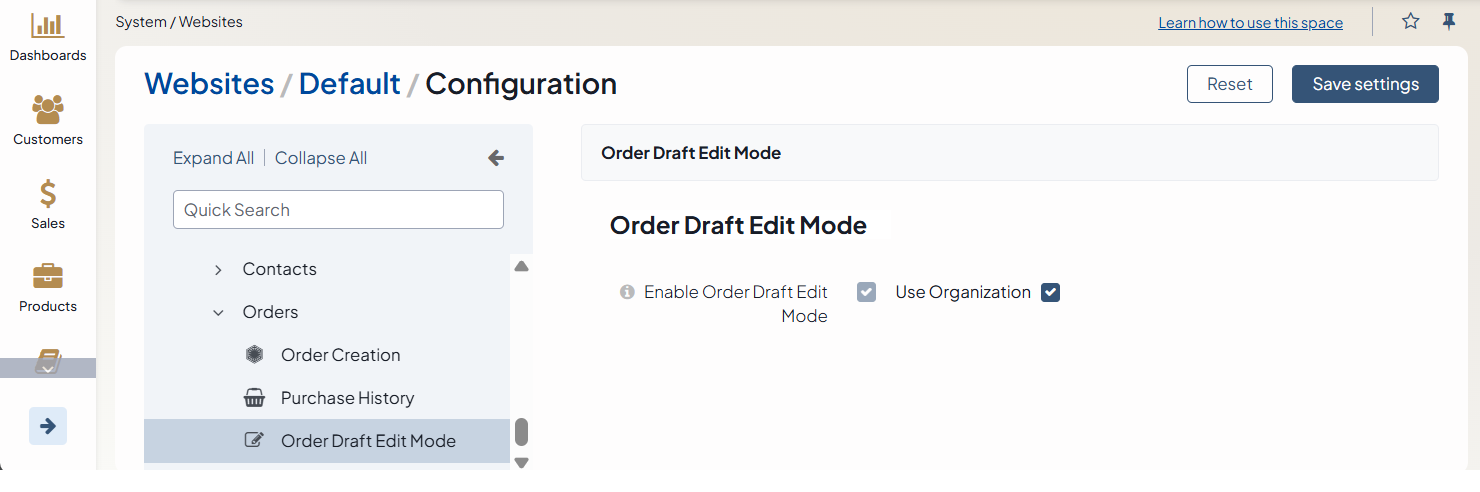
In the Order Draft Edit Mode section:
Clear the Use Organization checkbox to adjust the settings per specific website.
Select the checkbox next to Enable Order Draft Edit Mode to enable the feature.
Once enabled, the order edit page uses draft-based editing behavior for all order updates. For more details on the order draft editing behavior, please refer to the related article
Click Save Settings.
Related Topics