Important
You are browsing documentation for version 6.1 of OroCommerce, supported until 2029. Read the documentation for the latest LTS version to get up-to-date information.
See our Release Process documentation for more information on the currently supported and upcoming releases.
Serialized Fields
OroPlatform lets you create custom entities or custom fields for extended entities. Serialized fields let you add custom fields without a schema update.
These fields have some restrictions, however. Their data is stored in the serialized_data column as a serialized array, and this column is hidden from the UI on the entity config page.
Serialized Enum Fields
Serialized fields have different restrictions than enum fields (select, multiselect), which are also stored in the serialized_data column. The Enum fields functionality is described in Option Set Fields.
Not supported features:
grid filtering and sorting
segments and reports
charts
search
relations, and option set field types
data audit
usage of such fields in Doctrine query builder
Serialized Fields Access
Serialized fields are exposed as public class properties, handled by the entity’s magic __get and __set methods. They therefore have no getters or setters.
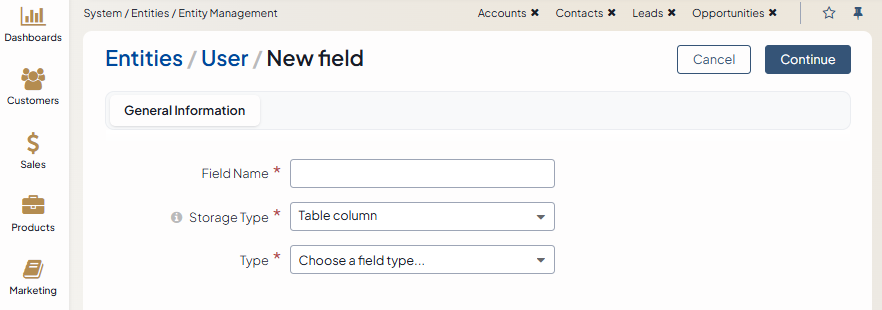
The Serialized Fields bundle adds a Storage Type field to the new field creation page, where you choose one of two storage types:
The Table Column option creates a custom field as usual.
The Serialized field option lets you avoid the schema update and use the field immediately. In this case, field types are limited to the following:
BigInt
Boolean
Date
DateTime
Decimal
Float
Integer
Select
Multi-select
Money
Percent
SmallInt
String
Text
WYSIWYG
To create a serialized field via migration, use SerializedFieldsExtension. For example:
<?php

namespace Acme\Bundle\DemoBundle\Migrations\Schema\v1_4;

use Doctrine\DBAL\Schema\Schema;
use Oro\Bundle\EntityExtendBundle\EntityConfig\ExtendScope;
use Oro\Bundle\EntitySerializedFieldsBundle\Migration\Extension\SerializedFieldsExtension;
use Oro\Bundle\EntitySerializedFieldsBundle\Migration\Extension\SerializedFieldsExtensionAwareInterface;
use Oro\Bundle\MigrationBundle\Migration\Migration;
use Oro\Bundle\MigrationBundle\Migration\QueryBag;

class AddSerializedFieldMigration implements Migration, SerializedFieldsExtensionAwareInterface
{
    protected SerializedFieldsExtension $serializedFieldsExtension;

    #[\Override]
    public function setSerializedFieldsExtension(SerializedFieldsExtension $serializedFieldsExtension)
    {
        $this->serializedFieldsExtension = $serializedFieldsExtension;
    }

    #[\Override]
    public function up(Schema $schema, QueryBag $queries)
    {
        $this->serializedFieldsExtension->addSerializedField(
            $schema->getTable('acme_demo_document'),
            'my_serialized_field',
            'string',
            [
                'extend'    => [
                    'owner' => ExtendScope::OWNER_CUSTOM,
                ],
                'entity' => ['label' => 'My serialized field'],
            ]
        );
    }
}
Serialized fields support the same set of config options as other configurable fields.
Business Tip
The upcoming frontier of eCommerce is B2B marketplaces. Discover how a business-to-business marketplace can help digitally transform your company.