Important
You are browsing documentation for version 5.1 of OroCommerce, supported until March 2027. Read the documentation for the latest LTS version to get up-to-date information.
See our Release Process documentation for more information on the currently supported and upcoming releases.
Search Index
The search index component handles interaction with a different search engine and the search index storage inside it.
In the Oro application, the search engine can:
perform search quickly (in comparison with the standard ORM search)
apply complicated filters to results
sort search results by relevancy or a specific field
extract additional data from the search index
calculate aggregated values
In this section, you will learn about the following concepts related to the search index.
Note
For developer’s documentation, see implementation specifics of the Elasticsearch and ORM-based search index, and the OroSearchBundle and OroWebsiteSearchBundle documentation for search index configuration.
Main Concepts
Search engine is specialized software that can store data, index data, and perform a quick and relevant search. Compared to conventional data storage, a search engine searches significantly faster and can run an overall full-text search in addition to searching by a specific area. Examples of search engines: Elasticsearch, Lucene, Solr. To use an analogy to relational databases, the search engine is similar to a Database Management System (DBMS).
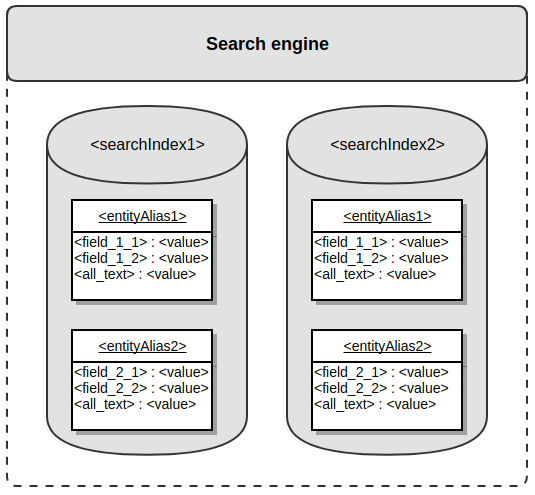
Search index (sometimes called just index) is the actual storage for a specific scope of search data. One search engine may work with several indexes. A search index is structured: it can organize data in complex multilevel structures, and the Oro application requires a minimum of two levels. It can validate the data type of the data stored inside. A search index is document-based storage where each document represents one specific entity from the main relational database, so it can be considered a specialized reflection of that database. To use an analogy to relational databases, the search index is similar to a database (DB).
Entity alias is a text representation of an entity name stored inside the specific search index. Entity alias represents the first level of the search index structure. To use an analogy to relational databases, an entity alias is similar to a table name.
Entity field is a text representation of an entity property name assigned to a specific entity alias. Entity alias represents the second level of the search index structure. Entity field has assigned data type (text, integer, decimal, datetime), and search engine uses this information to validate data stored inside the index. To use an analogy to relational databases, entity field is similar to a column name.
Entity field value is an actual value of an entity property assigned to a specific entity field. To use an analogy to relational databases, entity field value is similar to a value of a column.
All-text field is a particular entity field used to do a comprehensive full-text search. The value of this field is usually calculated automatically based on the text entity field values.
Search document is a combination of entity fields and entity field values and represents data of one specific entity from the main relational database. Search document has a simple structure - i.e., field values must not contain other documents. To use an analogy to relational databases, a search document is similar to a table row.
Indexation is a process of updating data in a search index - it might be the extraction of the required data from an entity and saving it to the search index or removing required documents from the search index.
Search mapping is a combination of entity aliases and entity field definitions. To use an analogy to relational databases, search mapping is similar to a database schema.
Search placeholder is a variable part of an entity alias or entity field that can be substituted with an actual value during the indexation or a search request.
The following diagram shows described structure:
Index Types
Oro applications use two types of indexes (standard and website) that use standard interfaces.
Common Interfaces
All index types use standard interfaces to provide a high-level abstraction for functionality that works with any type of search index (e.g., datagrids).
Search engine interface
Oro\\Bundle\\SearchBundle\\Engine\\EngineInterfaceis used to perform search requests to a search index.Search indexer interface
Oro\\Bundle\\SearchBundle\\Engine\\IndexerInterfaceis used for indexation, i.e., to change state of a search index (save data, remove data, reset index).
Standard Index Type
Note
The main logic of this index type is stored inside the OroSearchBundle in the platform package.
The standard index type (sometimes called the default index type or backend index type) is used in all applications based on OroPlatform. Each entity is represented by one plain entity alias and contains plain field names to represent data assigned directly to the primary entity or data from the related entities.
The standard index type triggers the following events:
oro_search.mapping_config — during the mapping collection process, used to alter mapping information;
oro_search.prepare_entity_map — during the indexation process, triggered for each entity, used to change data stored inside the index;
oro_search.before_search — before the search request, used to change search request before its execution;
oro_search.prepare_result_item — after the extraction of documents from the search index, used to populate additional information (entity objects, URLs, etc.).
The standard index type performs indexation on an entity level, triggering each entity’s indexation process. Search field values can be calculated automatically based on the defined search mapping. Each search document contains one all-text field value calculated automatically as a concatenation of all text entity field values. Each field might have several values. In this case, it will be represented as an array, and comparison operations will iterate over all of them. During the reindexation, the entities being reindexed are not available for search.
Search mapping can be stored inside any bundle in the Resources/config/oro/search.yml file. Engine-specific services have to be defined in the Resources/config/oro/search_engine/<engine>.yml file.
Website Index Type
Note
The main logic of this index type is stored inside the OroWebsiteSearchBundle in the commerce package.
The website index type (sometimes called the frontend index type) is used only in the OroCommerce application. Its main purpose is to give customers search functionality on the application frontend. Website search should be used only on the frontend because of its nature: the data is stored by websites (each website has its own scope in the storage), and some frontend-specific values (like localization) are necessary for frontend search use cases; for example, a user should be able to search data using only one specific localization.
Data for the website search index is collected and stored by websites and entity types. This means each entity for each website has its own scope in the storage, so these scopes are independent and can be handled separately. For example, a developer might reindex only a specific entity for a specific website without affecting any other entity at that website or any other website’s data.
Engine data collection is event based, so any bundle can add its own information to the search index. As a result, some entities in the index might contain information that is not directly related but is still valuable for searching by related areas.
Each entity is represented by one alias with an optional search placeholder (e.g., oro_product_WEBSITE_IT), so each website might have its own entity alias (e.g., oro_product_1 and oro_product_2). Entity fields might also contain search placeholders (e.g., name_LOCALIZATION_ID), so each field might have several values depending on the provided placeholders (e.g., name_1, name_2, and name_3).
Website index type triggers the following events:
oro_website_search.reindexation_request — triggers the reindexation process for the specified scope of entities;
oro_website_search.event.website_search_mapping.configuration — during the mapping collection process, used to alter mapping information;
oro_website_search.event.collect_context — before the indexation, used to collect context which will be used during the indexation;
oro_website_search.event.restrict_index_entity — during the indexation for all entities, used to decrease the number of entities that have to be indexed;
oro_website_search.event.restrict_index_entity.<alias> — during the indexation for the specific entity, used to decrease amount of specific entities that has to be indexed (pay attention that <alias> is a standard entity alias, not search entity alias);
oro_website_search.event.index_entity — during the indexation for all entities, used to collect data to put into the search index;
oro_website_search.event.index_entity.<alias> — during the indexation for the specific entity, used to collect data for a specific entity to put into search index (pay attention that <alias> is a standard entity alias, not search entity alias);
oro_website_search.before_search — before the search request, used to change the request before its execution.
Website index type performs reindexation on an entity batch level, triggering the indexation process for a batch of entities (default batch size is 100). Search field values must be calculated and set manually in a listener to the oro_website_search.event.index_entity event. Each search document contains all-text fields for each available localization (all_text_LOCALIZATION_ID) and one all-text field that includes values from all localizations, and values are calculated automatically based on a flag set during the indexation (i.e., a developer may specify what exact values should be in all-text field value). Each field without a placeholder must have only one value. During reindexation, entities being reindexed are available with the old (outdated) data.
Placeholders are defined in code in classes that implement Oro\Bundle\WebsiteSearchBundle\Placeholder\PlaceholderInterface. Here are the most commonly used placeholders (pay attention that there are more of them in a code):
WEBSITE_ID - integer identifier of a current website
LOCALIZATION_ID - integer identifier of a current localization
CUSTOMER_ID - integer identifier of a current customer user
CURRENCY - string identifier of a current currency
CPL_ID - integer identifier of a current combined price list
Search mapping can be stored inside any bundle in the Resources/config/oro/website_search.yml file. Engine-specific services have to be defined in the Resources/config/oro/website_search_engine/<engine>.yml file.
By design, website indexation supports both synchronous and asynchronous operation (refer to the Indexation Process section below). When triggering reindexation, you can define whether it should run in the synchronous or asynchronous mode. During the asynchronous reindexation, the appropriate message is put to the message queue and is processed by the consumer later by reindexing the required scope of entities.
WebsiteSearchBundle VS SearchBundle
The main difference between SearchBundle and WebsiteSearchBundle is the way index is stored. The website (frontend) index storage is separated from the platform index storage and may be moved to a separate server and thus may be properly scaled.
The next important difference is the information they control. The platform index handles the backend information (e.g., back-office), and the website index contains information about the frontend (e.g., storefront). As a consequence, the platform index is usually smaller and its search and indexation speed is well balanced, while the frontend index trades off indexation speed for faster search.
Though indexation might be a little slower than the backend index, the frontend index is more flexible in terms of extendability. It is event based, with several events that let you customize different parts of search and indexation.
Supported Search Engines
ORM Search
ORM search engine does not use actual document-based storage. Instead, it emulates such storage inside the application’s relational database using the EAV model. As a result, the ORM engine’s performance is not very good, so it is recommended only for small applications, with a couple of thousand entities.
The ORM search engine uses a separate Entity Manager and a connection called “search”, so search requests can be processed independently from the default DB connection.
The ORM search engine for the standard index type is implemented in the OroSearchBundle in the platform package; for the website index type, in the OroWebsiteSearchBundle in the commerce package.
See detailed information about the implementation of ORM search engine in the Manage Search in Oro Applications (ORM) topic.
Elasticsearch Search
Elasticsearch search engine allows storing considerable amounts of data and performing fast search queries. The performance of the Elasticsearch engine is quite good, and it is recommended for more extensive applications with hundreds of thousands and millions of entities.
Note
The Elasticsearch feature is only available in the Enterprise edition.
The Elasticsearch search engine requires credentials to connect to the actual index. Credentials include optional WWW-auth parameters and SSH connection support.
The Elasticsearch search engine for the standard index type is implemented in OroElasticSearchBundle in the platform-enterprise package. For the website index type, it is implemented in OroWebsiteElasticSearchBundle in the commerce-enterprise package.
The current implementation supports only Elasticsearch 2.* versions.
See detailed information about the implementation of ElasticSearch engine in Oro applications.
Data Structure
General Information
The search index stores documents grouped by entity alias. Each document contains scalar fields with values. One field is an all-text field used to perform the overall search. Data from related entities can also be stored, but it must be denormalized to a simple structure.
There are four supported entity field value data types:
text
integer (used to represent boolean values)
decimal
datetime (used to represent date values)
Note
See more details on a plain data structure with indexed data, localized data, and configuration examples in the Search Index Structure topic.
ORM Search
The ORM search engine stores attributes using the EAV model. One primary entity and four related entities store data for each supported field data type.
The primary entity contains the key information about the document, such as the entity class, entity ID, entity alias, default title, a flag that indicates whether the entity was changed, and createdAt/updatedAt. All four related entities have a similar structure: they store the name of the entity field and the actual entity field value. The following diagram illustrates this structure:
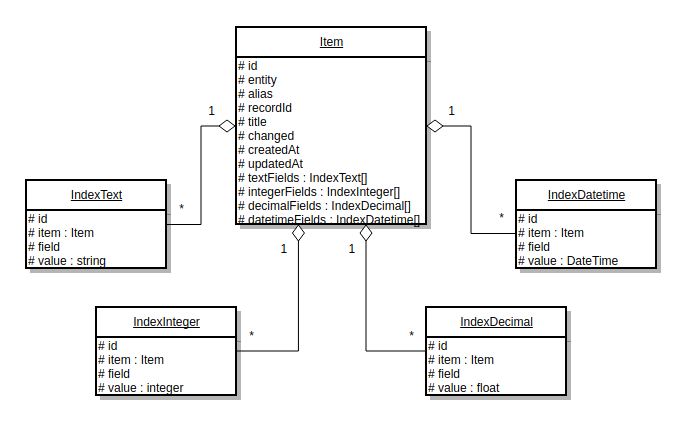
Each of the supported index types uses its own set of entities - 5 entities for the standard index type and 5 more entities for the website index type.
Elasticsearch Search
Elasticsearch search engine is document based from the beginning, so the index data structure is straightforward. The search index is represented by the Elasticsearch index.
Search aliases are represented by the Elasticsearch types. Search field values are stored inside the Elasticsearch document. Search mapping is defined at the Elasticsearch mapping and is generated automatically during index creation. The following diagram illustrates this structure:
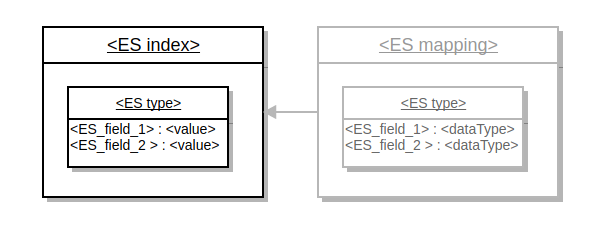
Each of the supported index types uses its own Elasticsearch index.
Example of Standard Index Type Document
Here is an example of the document from the standard index type under the oro_user entity alias.
{
"username":"admin",
"all_text":"admin admin@example.com example com John Doe",
"email":"admin@example.com",
"firstName":"John",
"lastName":"Doe",
"assigned_organization_id":[
   1
],
"organization":1,
"oro_user_owner":1
}
Pay attention to the following facts:
all_text field combines data from all other text fields
assigned_organization_id field contains an array of values
Example of Website Index Type Document
Here is an example of the document from the website index type under oro_product_WEBSITE_ID (WEBSITE_ID = 1) entity alias.
{
"assigned_to_variant_31":1,
"assigned_to_variant_25":1,
"assigned_to_variant_19":1,
"assigned_to_variant_11":1,
"newArrival":1,
"inventory_status_priority":2,
"product_id":2,
"category_id":8,
"visibility_anonymous":1,
"visibility_new":1,
"is_visible_by_default":1,
"all_text_1":"Retail Supplies Credit Card Pin Pad Reader Choosing the right credit card processing terminal to fit your business needs can help you increase your profits and reduce your processing costs. This credit card reader helps you do just that. Its easy-to-use ATM style interface accepts PIN-based debit card transactions and swipes traditional payment cards. It also accepts chip cards and features a built-in receipt printer Product Information & Features: Catalog Page: 2976 Performs PIN based debit card transactions Accepts chip cards Prints transaction receipts Connectivity: USB (not included) Large, backlit display Supports all magnetic stripe cards Color: Purple Technical Specs: Width: 6\u201d Height: 3\u201d Weight: .6 lb. Acme defaultMetaDescription defaultMetaKeywords 1AB92",
"sku":"1AB92",
"names_1":"Credit Card Pin Pad Reader",
"shortDescriptions_1":"Choosing the right credit card processing terminal to fit your business needs can help you increase your profits and reduce your processing costs. This credit card reader helps you do just that. Its' easy-to-use ATM style interface accepts PIN-based debit card transactions and swipes traditional payment cards. It also accepts chip cards and features a built-in receipt printer",
"inventory_status":"out_of_stock",
"sku_uppercase":"1AB92",
"status":"enabled",
"type":"simple",
"image_product_large":"\/media\/cache\/attachment\/resize\/11\/product_large\/59d20f5ae821f060277950.jpeg",
"image_product_medium":"\/media\/cache\/attachment\/resize\/11\/product_medium\/59d20f5ae821f060277950.jpeg",
"product_units":"a:2:{s:4:\"item\";i:0;s:3:\"set\";i:0;}",
"category_path":"1_8",
"category_title_1":"Retail Supplies",
"minimal_price_3_EUR_item":"60.8000",
"minimal_price_7_EUR_item":"60.8000",
"minimal_price_2_USD_item":"60.8000",
"minimal_price_6_USD_item":"60.8000",
"minimal_price_4_EUR_item":"60.8000",
"minimal_price_1_EUR_item":"76.0000",
"minimal_price_5_EUR_item":"60.8000",
"minimal_price_5_USD_item":"60.8000",
"minimal_price_1_USD_item":"76.0000",
"minimal_price_4_USD_item":"60.8000",
"minimal_price_6_EUR_item":"60.8000",
"minimal_price_2_EUR_item":"60.8000",
"minimal_price_7_USD_item":"60.8000",
"minimal_price_3_USD_item":"60.8000",
"minimal_price_7_EUR":"60.8000",
"minimal_price_3_EUR":"60.8000",
"minimal_price_1_EUR":"76.0000",
"minimal_price_6_USD":"60.8000",
"minimal_price_4_EUR":"60.8000",
"minimal_price_4_USD":"60.8000",
"minimal_price_6_EUR":"60.8000",
"minimal_price_1_USD":"76.0000",
"minimal_price_3_USD":"60.8000",
"minimal_price_7_USD":"60.8000",
"minimal_price_5_EUR":"60.8000",
"minimal_price_2_USD":"60.8000",
"minimal_price_2_EUR":"60.8000",
"minimal_price_5_USD":"60.8000",
"tmp_alias":"oro_product_1_website_search59d7a947de6e69.38892637"
}
Keep in mind that:
multiple values are denormalized to a one level structure according to passed placeholder values - assigned_to_ASSIGN_TYPE_ASSIGN_ID, minimal_price_CPL_ID_CURRENCY_UNIT etc
localized values are related to specific locale (LOCALIZATION_ID = 1) - names_LOCALIZATION_ID, shortDescriptions_LOCALIZATION_ID etc
localized all-text fields (LOCALIZATION_ID = 1) - all_text_LOCALIZATION_ID
tmp_alias field is used to maintain outdated data during the reindexation and understand which entities have to be removed after the reindexation
Search Request
To perform a search request, a developer builds a query for the search index. A search query has two representations: string and object.
String Representation
The string representation is similar to a standard SQL query. This string may contain keywords select, from, where, aggregate, order_by, offset, and max_results. The string representation is used mainly in the API, where users can request specific data with a specific condition. During the processing of string representation, it is converted to object representation.
Object Representation
Object representation has two levels: low and high.
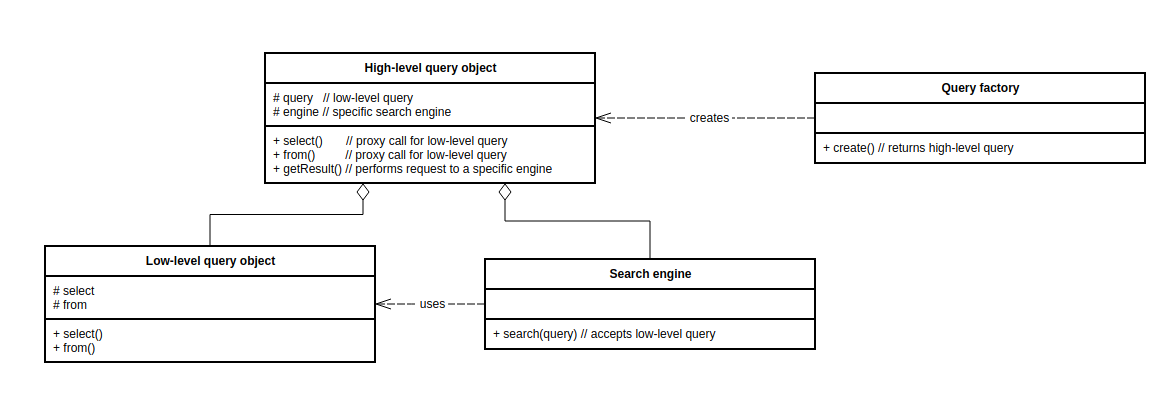
Low-level object (Oro\Bundle\SearchBundle\Query\Query, sometimes called a search query builder) represents a query and has parts similar to the string representation (select, where, etc.). It is not aware of a specific search engine, and all search engines use it as the main query representation. In fact, the low-level object is a Data transfer object.
High-level object (implementation of Oro\Bundle\SearchBundle\Query\SearchQueryInterface) hides search-engine-specific logic from the developer. It embeds low-level objects and proxies most of the calls. The query factory (implementation of Oro\Bundle\SearchBundle\Query\Factory\QueryFactoryInterface) creates high-level objects. Each index type has its own high-level object implementation, which encapsulates how the query must be executed, and its own query factory implementation responsible for creating the high-level object. The high-level object is a Facade.
The following diagram demonstrates the connection between the low-level object, the high-level object, the query factory, and the search engine:
Triggering Search Request
The recommended way to trigger a search request is to get an instance of the high-level object, build a query, execute it and get results. We also recommend isolating all search requests in a search repository (see Best Practices section) to separate storage logic from business logic.
However, if you need to work on the lower level (e.g., to write a functional test), you can get an instance of an appropriate search engine type. All following engines implement the standard search engine interface Oro\Bundle\SearchBundle\Engine\EngineInterface:
standard ORM engine - Oro\Bundle\SearchBundle\Engine\Orm, service ID is oro_search.search.engine;
standard Elasticsearch engine - Oro\Bundle\ElasticSearchBundle\Engine\ElasticSearch, service ID is oro_search.search.engine;
website ORM engine - Oro\Bundle\WebsiteSearchBundle\Engine\ORM\OrmEngine, service ID is oro_website_search.engine;
website Elasticsearch engine - Oro\Bundle\WebsiteElasticSearchBundle\Engine\ElasticSearchEngine, service ID is oro_website_search.engine.
All these engines accept low-level query and execution context as an argument and return an object with a list of found entities, the total number of results, and requested aggregated data.
Indexation Process
OroCommerce provides two types of data synchronization: scheduled (asynchronous) and immediate (synchronous). Scheduled synchronization suits entities whose changes are not critical and can be applied after an acceptable delay, or large volumes of heavy data that must be indexed separately to avoid affecting website performance. Immediate (synchronous) indexation updates the index as soon as the underlying data changes, such as inventory or payment updates.
Asynchronous Indexation
Most of the indexation operations are performed asynchronously using a message queue.
The advantage of this approach is that a user does not wait until the indexation is finished to see the response from the application. Asynchronous indexations can also be performed in parallel to speed up the overall indexation process. The disadvantage is that indexation may happen with a delay; the delay time depends on the number of consumers, server hardware, and queue length.
Every time an entity represented by a document in a search index is changed, a new message with the entity class and entity identifier is generated and sent to the message queue. Then, the message queue consumer receives this message and runs an appropriate message processor that performs real indexation and changes in the search index.
Remember that parallel indexation is possible only if several message queue consumers are running; each consumer can run indexation. The higher the number of consumers running, the more indexations can be performed in parallel. All automatically triggered reindexations are processed asynchronously.
The default asynchronous indexer is implemented in the Oro\\Bundle\\WebsiteSearchBundle\\Engine\\AsyncIndexer class and is accessible via the oro_website_search.async.indexer service. To trigger asynchronous indexation, trigger the ReindexationRequestEvent and set the $Scheduled parameter to true.
Synchronous Indexation
Although asynchronous processing is convenient for users, you sometimes need to track the process manually and ensure indexation finishes right away. In this case, use synchronous indexation instead. The advantage is that indexation happens immediately, without any delay. The disadvantage is that it might be slower, with worse UX than asynchronous indexation.
Triggering Reindexation
From the Code
The website search index type provides an event called oro_website_search.reindexation_request to manually trigger the reindexation process for the specified entities. It uses the event class Oro\Bundle\WebsiteSearchBundle\Event\ReindexationRequestEvent which accepts the $Scheduled boolean parameter to specify whether indexation has to be asynchronous (default behavior, TRUE) or synchronous (FALSE).
Both standard and website search index types have synchronous and asynchronous indexers that trigger the corresponding indexation type. All following indexers implement the same standard indexer interface Oro\Bundle\SearchBundle\Engine\IndexerInterface:
Standard search indexer
standard asynchronous indexer —
Oro\\Bundle\\SearchBundle\\Async\\Indexer, service ID isoro_search.async.indexer. The indexer is used to redirect indexation request to message queue.standard synchronous ORM indexer —
Oro\\Bundle\\SearchBundle\\Engine\\OrmIndexer, service ID isoro_search.search.engine.indexer.standard synchronous Elasticsearch —
Oro\\Bundle\\ElasticSearchBundle\\Engine\\ElasticSearchIndexer, service ID isoro_search.search.engine.indexer.
Website search indexer
website asynchronous indexer —
Oro\\Bundle\\WebsiteSearchBundle\\Engine\\AsyncIndexer, service ID isoro_website_search.async.indexer. The indexer is used to redirect indexation request to message queue.website ORM indexer —
Oro\\Bundle\\WebsiteSearchBundle\\Engine\\ORM\\OrmIndexer, service ID isoro_website_search.indexer.website Elasticsearch indexer —
Oro\\Bundle\\WebsiteElasticSearchBundle\\Engine\\ElasticSearchIndexer, service ID isoro_website_search.indexer.
All these indexers accept entities of an entity class that has to be reindexed.
Granularized asynchronous indexation
All asynchronous indexers (Oro\\Bundle\\WebsiteSearchBundle\\Engine\\AsyncIndexer) are using the Oro\\Bundle\\WebsiteSearchBundle\\Engine\\AsyncMessaging\\ReindexMessageGranularizer class to automatically split the request message in chunks per entity and websiteId.
The granulizer does the following:
To handle the Product entity within all websites [1, 2, 3, 4, 5], the granularizer splits the message into 5 separate groups, that allows handling each Product entity with each websiteId separately.
To handle requests that contain large amounts of entityIds, the granularizer splits entityIds table into smaller chunks, for example 1000 entityIds will be split into 10 messages with 100 entityIds each.
Note
For more event triggering examples, see the Website Search Indexation article.
From the CLI
Both standard and website index types automatically trigger the reindexation process when entity data or related configuration is changed. Reindexation can take a lot of time for a significant amount of data, so we recommend running it on a schedule (e.g., once a day).
Synchronously
Search index type provides CLI command that can be used to manually (synchronously) trigger full reindexation of all entities or only entities of a specific class.
Standard search index command:
php bin/console oro:search:reindex
Website search index command:
php bin/console oro:website-search:reindex
Asynchronously
Reindexation can also be scheduled to be performed in the background by the message queue consumers (asynchronous reindexation). You will need a configured message queue and at least one running consumer worker to use this mode.
You need to use the scheduled parameter to run indexation asynchronously.
Standard search index command:
php bin/console oro:search:reindex --scheduled
Website search index command:
php bin/console oro:website-search:reindex --scheduled
Note
For more console code examples, see the Standard search index console commands and Website search index console commands articles.
Partial Indexation
Partial indexation reduces the load on the engine by updating the index partially. The index is divided into groups ($fieldGroups), and each group includes specific fields to use in the update process. Partial indexation is a good option for both synchronous and asynchronous indexation when you need to update one or multiple field groups without affecting others (e.g., product prices).
Supported field groups are: main, collection_sort_order, image, category_sort_order, visibility, pricing, order, customer_recommendation_action, customer_recommendation_revenue, inventory (multiple values allowed).
Note
For more partial indexation code examples, see the Website search partial indexation commands articles.
Schedule or Skip Reindexation
When you run the oro:platform:update command as part of the update process, it performs full reindexation of all affected entities in the foreground.
To avoid this, you can use the --schedule-search-reindexation and --skip-search-reindexation options that were added to the oro:platform:update command by the SearchBundle and were extended by the WebsiteSearchBundle to also affect the Website search index:
--schedule-search-reindexation
This option allows you to postpone full reindexation. In this case, the reindexation command will be added into the message queue and will be executed later, when message queue consumers will be started.
--skip-search-reindexation
This option allows to completely skip reindexation during the update process.
Force Reindexation
If, after customizations, upgrades, and code modifications, the ElasticSearch index structure remains unchanged or only gains new fields, you only need to initiate the indexing process.
If the changes affect the ElasticSearch index structure (ElasticSearch mapping), you must recreate the index and force full indexation. The ES index must be filled with new data from scratch to save it into the new index structure.
For that, you need to:
Recreate the index data to make a new empty structure with no data.
Force full indexation to fill the empty structure with new data and new structure.
You can do it using the following commands for the back-office (standard) index:
php bin/console cache:clear --env=prod
php bin/console oro:elasticsearch:create-standard-indexes --env=prod
php bin/console oro:search:reindex --env=prod --scheduled
The same can be done for the storefront (website) index using commands:
php bin/console cache:clear --env=prod
php bin/console oro:website-elasticsearch:create-website-indexes --env=prod
php bin/console oro:website-search:reindex --env=prod --scheduled
ACL Restrictions
Standard Index Type
The standard index type automatically adds owner and organization fields to all entities and fills them with data during the indexation process. Then during the search request, ACL restrictions are automatically applied to a low-level query to show only entities the current user is allowed to see.
Website Index Type
The website index type doesn’t have common ACL protection like the standard index type. Instead, each entity can be protected by custom-specific conditions. For example, the visibility of a Product entity to a customer user is affected by a product status, product inventory status, and product visibility settings on a customer, customer group, and website levels.
Scalability
ORM Search
The ORM search engine uses a DBMS as the main storage, so its scalability depends on the scalability of the DBMS. For example, PostgreSQL supports several clustering solutions, so the ORM search index can be scaled together with the main relational DB.
Another solution is available. Because the ORM search engine uses its own connection and its own entity manager, you can move all search-related tables to a separate DB on a remote server. In this case, the application administrator overrides the configuration for the connection called search and points it to the remote server.
Elasticsearch Search
The Elasticsearch search engine is horizontally scalable out of the box: it can be organized as an Elasticsearch cluster with several nodes. The application administrator can specify how many Elasticsearch shards the index consists of (how many parts it is split into); the default number of shards is 5. Then, depending on the number of nodes in the cluster, the search engine can move shards to different nodes to perform distributed search.
Logging
In the dev mode, both standard and website search indexes log all requests to search index storage (DB or Elasticsearch); in the prod mode, only exceptions are logged. In the prod mode, all exceptions are also sent to the emails specified in the System Configuration > General setup > Application settings > Error logs notification section of the system configuration.
The standard search index can also log all search queries to the database table oro_search_query (the entity name is Oro\Bundle\SearchBundle\Entity\Query); by default, this logging is turned off.
Elasticsearch engine implementations use their own Monolog logger channels: oro_elastic_search for the standard index type and oro_website_elastic_search for the website index type.
Use Cases
Datagrids
A special datagrid search datasource works with the search index. It works with the high-level search query object and supports both index types. Datagrids based on this datasource use configuration similar to ORM configuration: a developer can specify shown columns, filters, sorters, properties, and actions.
Implemented search datagrids:
search results grid (search-grid) - used to show results of the overall search in all Oro applications; a grid can show any entity;
products frontend grid (frontend-product-search-grid) - used to represent a list of products and show product search results at OroCommerce frontend part; a grid shows only Product entities.
Autocomplete
Autocomplete form types, by default, use the standard search index type to find entities and show them to the user (see Oro\Bundle\FormBundle\Autocomplete\SearchHandler). They do not use a string or an object query representation directly. Instead, they use the indexer from the standard search index, which uses the low-level query object inside.
Search APIs
The standard search index provides API resources for working with it.
Simple search API accepts:
search request - plain string used to perform the search in the all-text field;
entity alias (optional);
offset (optional) - used for pagination;
max results (optional) - used for pagination.
Advanced search API accepts a string representation of a search request.
In both cases, API returns a list of found entities.
Business Tip
New technologies empower digital transformation in key industries such as manufacturing. Read how companies use eCommerce to enable digital transformation in manufacturing.
References
Table of Contents