Important
You are browsing documentation for version 6.0 of OroCommerce, supported until 2028. Read the documentation for the latest LTS version to get up-to-date information.
See our Release Process documentation for more information on the currently supported and upcoming releases.
Action Groups
Action Group is a named block of execution logic grouped under its own actions configuration node. You can call action groups with the @run_action_group action in any application configuration node that Action Component supports.
The Action group declaration also has an important parameters section that describes all the data it expects from the caller (with a type, requirement, default value, and validation message).
Parameters are accessible in actions as the root node of contextual data (e.g., $.parameterName). Along with parameters and actions, you can optionally declare a special acl_resource criteria and a custom conditions node, where you define special instructions to check before execution.
Action Group Configuration
action_groups: # root node for action groups
    demo_flash_greetings_to: # name of action group
        replace:                                    # (optional) the list of nodes that should be replaced during the overriding
            - actions                               # node name
        parameters: # parameters declaration node
            what: # name of the parameter
                type: AcmeDemoBundle/String/Phrase  # (optional, default = any) type validation of parameter (available types: integer, string, boolean, array, double, object, PHP class)
                message: "Bad type"                 # (optional) message to be prompted if parameter validation failure met
                default: "Hello"                    # (optional) default value for optional parameter, if not set then parameter `what` is required
            who: ~                                  # set all defaults to parameter options (type: any)
        conditions: # Condition expression
            '@not_empty': [ $.who ]
        actions: # list of actions that should be executed
            -   '@call_service_method':
                    service: type_guesser
                    method: guess
                    method_parameters: [ $.who ]          # as you can see, parameters are accessible from root $.<parameterName>
                    attribute: $.typeOfWho
            -   '@flash_message':
                    message: '$.result[message]'
                    type: 'info'
                    message_parameters:
                        param1: $.what
                        param2: $.typeOfWho
Next, run this action_group as follows:
@run_action_group:
    action_group: demo_flash_greetings_to
    parameters_mapping:
        who: $.myInstanceWithVariousType
Here, we skip the what parameter, which has the default value.
To see the @run_action_group syntax, refer to the actions section.
Data Isolation
An Action group runs with empty context data. For example, if a caller context is mapped with parameters_mapping to a new context (under @run_action_group), the action group executes with that context. In this case, only the data supported by the action group parameters declaration is available. This is why action groups can be called from different places and under various circumstances.
Call from PHP
All named action groups are gathered internally in the oro_action.action_group_registry registry service, an instance of the Oro\Bundle\ActionBundle\Model\ActionGroupRegistry class. Its simple API lets you get a configured action group instance and execute it via the \Oro\Bundle\ActionBundle\Model\ActionGroup::execute method with the proper parameters.
Recommendations
User Interface
In the actions block above, we used the @flash_message action as an example. Usually, you do not perform any user interface-related actions in the action group actions set, because action groups run only in contexts where no user interface is available at runtime.
Using Results of Action Group
`ActionInterface` implements most actions and stores their results in an execution context object — usually one of the `AbstractStorage` child instances. So you access all the action group results from the context data passed to its execute(…) method.
The @run_action_group action has two configuration options for this: results (transfers data from the action group context to the caller context separately) and result (allocates all context of the executed action group under a desired node of the caller context).
Hint
See Actions for more information about @run_action_group options.
Exposing Service as Action Group
Action Group is a simple way to expose logic to YAML so that other Action Groups, Actions, or Workflows can use it. However, supporting complex logic in YAML may eventually require too much effort.
To keep the logic maintainable, you can move it from the action group to a service and gain all the advantages of writing code in PHP. Another use case is to make an existing service method available as an action group.
action_groups:
    prettify_string:
        service: acme.demo.useful_functions
        method: prettifyString
        return_value_name: pretty_string
        parameters:
            input_string:
                service_argument_name: input
In the example above, the prettifyString method of the acme.demo.useful_functions service is exposed as an action group named prettify_string, with the input method argument mapped to the input_string action group parameter. By default, PHP Reflection exposes all method parameters as action group parameters, with their types and default values. return_value_name maps the method return value correctly to the action data context.
Instead of exposing the service method as an action group, you can use the call_service_method action — it is up to the developer which syntax to use. Still, action group services are useful for backward compatibility: complex logic that has been moved to PHP can still be called from different places as an action group.
Action Group Events
The platform triggers several events at various points in the action group lifecycle. These events let developers hook into the execution process and run custom logic at specific points — particularly useful for adding business logic, sending notifications, or updating external systems based on action group activity. A special guard event can prevent the action group from being executed.
Available Events
oro_action_group.guard
Validate whether the action group is allowed. This is a guard event.
The two events being dispatched are:
oro_action_group.guard
oro_action_group.[action group name].guard
oro_action_group.pre_execute
An action group logic is starting execution (triggered right before the execution of action group actions).
The two events being dispatched are:
oro_action_group.pre_execute
oro_action_group.[action group name].pre_execute
oro_action_group.execute
An action group logic is being executed (triggered right after execution of action group actions).
The two events being dispatched are:
oro_action_group.execute
oro_action_group.[action group name].execute
Action Executor Helper
When you move an action group to PHP, its logic may depend on existing actions and conditions that can’t simply be called from PHP, because they are tightly coupled to the action/expression component architecture and execution context. To simplify this transition, the Oro\Bundle\ActionBundle\Model\ActionExecutor helper provides the following methods for executing existing actions and action groups and evaluating expression conditions:
public function executeAction(string $actionName, array $data = []): mixed;
public function executeActionGroup(string $actionGroupName, array $data = []): ActionData;
public function evaluateExpression(
    string $expressionName,
    array $data = [],
    \ArrayAccess $errors = null,
    string $message = null
): bool;
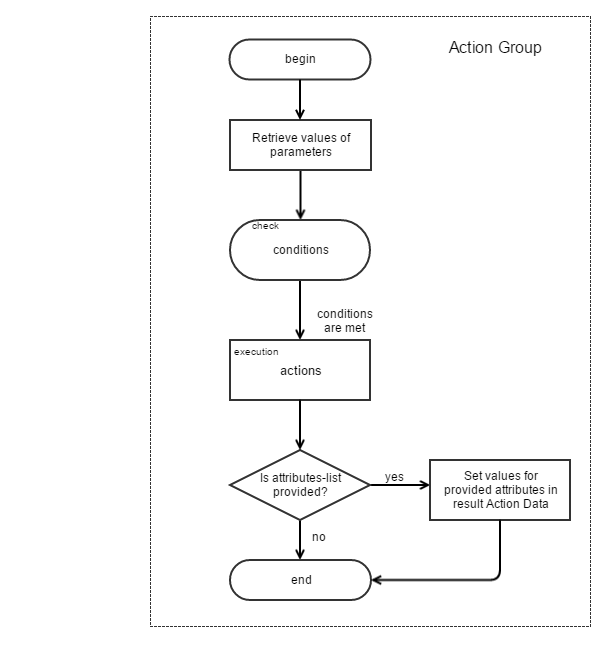
Action Group Diagram
The following diagram shows the logic of the action group process: