Important
You are browsing upcoming documentation for version 7.1 of OroCommerce, scheduled for release in 2027. Read the documentation for the latest LTS version to get up-to-date information.
See our Release Process documentation for more information on the currently supported and upcoming releases.
Operations (Actions)
Operations let you assign any interaction with a user by specifying:
Entity classes
Routes
Datagrids
Every active operation shows a button or a link on the corresponding page. The button or link appears only when the preconditions section evaluates to true.
After a user clicks the button or link, the operation runs only if the conditions section evaluates to true.
If the operation has a form dialog configuration, a modal dialog with fields appears when the user clicks the button.
Each operation relates to an entity type (a full class name) or\and a route of the page where the operations should be displayed or\and a datagrid.
Before the page loads, ActionBundle selects the operations that match the page entity or route, then checks them against their preconditions. If all preconditions are met, the operation’s button is displayed.
After the user clicks the button, all the performed operations (and underlined actions) run, provided the preconditions of the operation and the conditions of the actions are met.
Operation Configuration
You can describe all operations in the actions.yml configuration file under the corresponding bundle in the config/oro resource directory.
The example below shows a simple operation configuration that runs execution logic with the MyEntity entity.
operations: # root elements
    acme_demo_operation:                                # operation name
        extends: acme_demo_operation_base               # (optional) parent operation if needed
        label: 'Acme demo operation'                    # this value will be shown in UI for operation button
        substitute_operation: some_operation            # configuration of 'some_operation' will be replaced by configuration of this operation
        enabled: $variable                              # operation status will be determined later, means used in application, but button is disabled on front-end if status will be false
        entities: # on view/edit pages of this entities operation button will be shown
            - Acme\Bundle\DemoBundle\Entity\Question    # entity class name
        routes: # on pages with these routes operation button will be shown
            - acme_demo_priority_view                   # route name
        datagrids: # in listed datagrids operation icon will be shown
            - acme-demo-question-grid                   # datagrid name
        order: 10                                       # display order of operation button
        acl_resource: acme_demo_question_view           # ACL resource name that will be checked on preconditions step
        button_options:                                 # (optional) display options for operation button
            icon: fa-check                              # (optional) class of button icon
            class: btn                                  # (optional) class of button
            group: acme.demo.operations.demogroup.label # (optional) group operation to drop-down on the label
            template: '@OroAction/Operation/button.html.twig'   # (optional) custom button template
            data:                                               # custom data attributes which will be added to button
                param: value
                customTitle: $.customTitle
            page_component_module: acmedemo/js/app/components/demo-component
            page_component_options:                                       # (optional) js-component module options
                component_name: '[name$="[component]"]'
                component_additional: '[name$="[additional]"]'
        frontend_options:                                                 # (optional) display options for operation button
            confirmation: acme.demo.operations.operation_perform_confirm
            template: '@OroAction/Operation/form.html.twig'               # (optional) custom template, can be used both for page or dialog
            title: acme.demo.operations.dialog.title                      # (optional) custom title
            title_parameters:
                '%%some_param%%': $.paramValue
            options:                                                      # (optional) modal dialog options
                allowMaximize: true
                allowMinimize: true
                dblclick: maximize
                maximizedHeightDecreaseBy: minimize-bar
                width: 500
            show_dialog: true
        attributes:                                                # (optional) list of all existing attributes
            question:                                              # attribute name
                label: 'Question'                                  # attribute label
                type: entity                                       # attribute type
                options:                                           # attribute options
                    class: Acme\Bundle\DemoBundle\Entity\Question  # (optional) entity class name, set if type is entity
            company_name:
                label: 'Company name'
                type: string
            group_name:
                property_path: user.group.name
        datagrid_options:
#            mass_action_provider:                             # (optional) service name, marked with "oro_action.datagrid.mass_action_provider" tag
#                acme.action.datagrid.mass_action_provider     # and must implement Oro\Bundle\ActionBundle\Datagrid\Provider\MassActionProviderInterface
            mass_action:                                       # (optional) configuration of datagrid mass action
                type: window
                label: acme.demo.mass_action.label
                icon: plus
                route: acme_demo_bundle_massaction
                frontend_options:
                    title: acme.demo.mass_action.action.label
                    dialogOptions:
                        modal: true
            data:
                type: import
                importProcessor: 'acme_import_processor'
                importJob: 'acme_import_from_csv'
        form_options:                                                               # (optional) parameters which will be passed to form dialog
            attribute_fields:                                                       # list of attribute fields which will be shown in dialog
                question:                                                           # attribute name (must be configured in `attributes` block of action config)
                    form_type: Symfony\Component\Form\Extension\Core\Type\TextType  # needed type of current field
            attribute_default_values:                                     # (optional) define default values for attributes
                question: $question                                       # use attribute name and property path or simple string for attribute value
        preconditions:                                                    # (optional) pre-conditions for display Action button
            '@equal': [ $name, 'John Dow' ]                               # condition definition
        conditions:                                                       # (optional) conditions for execution Action button
            '@not_empty': [ $group ]                                      # condition definition
        preactions:                                                       # (optional) any needed pre actions which will execute before pre conditions
            -   '@assign_value': [ $name, 'User Name' ]                   # action alias
            -   '@assign_value': [ $variable, true ]                      # preaction that determines value for enabled
        form_init:                                                        # (optional) any needed actions which will execute before showing form dialog
            -   '@assign_value': [ $group, 'Group Name' ]                 # action alias
        actions:                                                          # (optional) any needed actions which will execute after click on th button
            -   '@create_entity':                                         # action definition
                    class: Acme\Bundle\DemoBundle\Entity\User
                    attribute: $user
                    data:
                        name: $name
                        group: $group
This configuration describes an operation that relates to the Question entity. The button labeled “adme.demo.myentity.operations.myentity_operation” appears on the entity’s view page (acme_demo_myentity_view) when the ‘updatedAt’ field > new DateTime(‘now’).
If the entity’s expired property = false, clicking the button triggers the “assign_value” action, which sets the ‘expired’ field to true.
If form_options are specified, the form dialog with attributes fields appears when the user clicks the button. The actions run only on form submit.
Instead of adding the operation logic to the configuration file, you can place it in a separate service that implements OperationServiceInterface. This interface has three methods: isPreConditionAllowed, isConditionAllowed, and execute.
To use an operation service, set it in the operation configuration with the service parameter. In this case, you cannot use preactions, preconditions, conditions, and action; move their logic to the appropriate method of the operation service.
Operation Events
The platform triggers several events at various points in the operation lifecycle. These events let developers hook into the execution process and run custom logic at specific points, which is useful for adding business logic, sending notifications, or updating external systems based on operation activity. Special guard events can prevent an operation from being executed or displayed.
Available Events
oro_operation.announce
Validate whether the operation button is allowed This is a guard event.
The two events being dispatched are:
oro_operation.announce
oro_operation.[operation name].announce
oro_operation.guard
Validate whether the operation is allowed. This is a guard event.
The two events being dispatched are:
oro_operation.guard
oro_operation.[operation name].guard
oro_operation.pre_execute
Operation logic is starting execution (triggered right before the execution of operation actions).
The two events being dispatched are:
oro_operation.pre_execute
oro_operation.[operation name].pre_execute
oro_operation.execute
Operation logic is being executed (triggered right after execution of operation actions).
The two events being dispatched are:
oro_operation.execute
oro_operation.[operation name].execute
Configuration Validation
Execute a command to validate all operations configurations:
php bin/console oro:action:configuration:validate
Note
All configurations apply automatically after their changes are made in the developer environment.
Default Operations
Oro Action Bundle defines several system-wide default operations. These are basic CRUD operations for entities:
UPDATE - operation for an entity editing that uses a route from the routeUpdate option of the entity configuration.
DELETE - operation for an entity deletion that uses a route from the routeName option of the entity configuration.
If the default operations are used in the non-default applications (like in commerce), the routes are retrieved from the routeCommerceUpdate and routeCommerceDelete options.
Configurations for the default operations are allocated in the Resources/config/oro/actions.yml file under the Oro Action Bundle directory.
Questions and Answers
How to disable a CRUD default operation for my Bundle?
Suppose you need to disable the default DELETE operation for your new MyEntity entity. Do this in actions.yml under your bundle configuration resources directory:
operations:
    DELETE:
        exclude_entities: ['MyEntity']
During configuration compilation, this merges an additional condition into the default operation so that the default DELETE operation no longer matches your entity and is not displayed.
Can I disable default operation for my datagrid?
Yes. There are two ways to do that:
Disable the operation by updating your datagrid configuration in its action_configuration section. Define a key corresponding to the operation name with the false value.
datagrids.yml:
datagrids:
    your_datagrid_name:
        #... datagrid config sections
        action_configuration:
            some_default_common_operation: false
some_default_common_operation is no longer displayed at the your_datagrid_name grid. However, action_configuration can accept a callable as a value, so a service callback sometimes occupies the option. In that case, use a different approach.
Disable the operation for a custom datagrid using the exclude_datagrids option in the operation definition. This lets you specify the name of the datagrid to exclude from operation matching.
If another bundle defines your operation, use the merge behavior of operation configuration to add a property value under your bundle configuration.
For example, suppose you want to hide the default DELETE operation from OroActionBundle for the product_view datagrid. Exclude your grid from matching by adding the following options to
<YourBundle>/Resources/config/oro/actions.ymlfor the backend datagrid and to<YourBundle>/Resources/views/layouts/<theme>/config/datagrids.ymlfor the frontend datagrid.
operations:
    DELETE:
        exclude_datagrids:
            - product_view
You can define, reuse, or customize the operation definition in other ways too. Along with basic merge, the replace, extend, and substitute_operation options help in different cases.
How can I modify CRUD default operation for my Bundle?
To customize a default or any other operation, change its label as follows:
operations:
    my_special_entity_custom_edit:
        extends: UPDATE                         # this is for keeping all other properties same as in default
        label: 'Modify me'                      # custom label
        substitute_operation: UPDATE            # replace UPDATE operation with current one
        entities: ['MyEntity']                  # replacement will occur only if this operation will be matched by entity
        for_all_entities: false                 # overriding extended property for `entities` field matching only
This example uses the substitution mechanism: the operation named in the substitute_operation field is replaced by the current one.
You can also limit the modification to the entities named in the entities field. To replace the operation fully instead of copying the extended version, omit the extends field and define the custom body.
See the substitution section in the configuration documentation for more details.
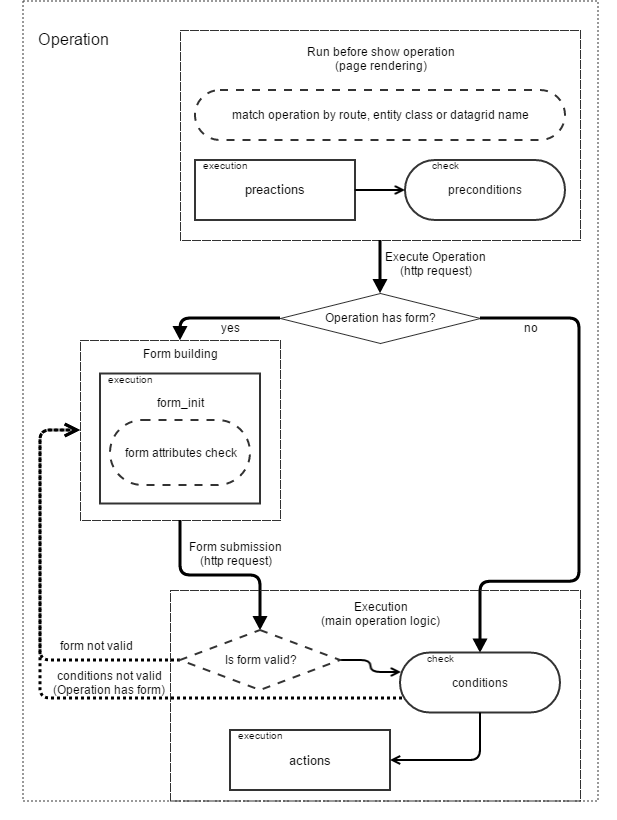
Operation Diagram
The following diagram shows the logic of operation processes: