Message Queue
The OroMessageQueue bundle integrates the OroMessageQueue component. It adds an easy-to-use configuration layer, registers services and ties them together, and registers CLI commands.
The MessageQueue component incorporates a message queue in your application via different transports. It contains several layers.
The lowest layer, Transport, abstracts the transport protocol. On top of it, the Consumption layer provides tools to consume messages, such as the CLI command, signal handling, logging, and extensions.
The Client layer provides the ability to start producing/consuming messages with as little configuration as possible.
Structure
Publish/Subscribe Messaging
OroMessageQueue uses Publish/subscribe messaging: the sending application publishes (sends) a message with a specific topic, and a consumer finds the subscriber(s) for that topic. This decouples the information provider from its consumers, so the sending and receiving applications do not need to know anything about each other.
Terminology
Message — An information message that contains a message topic, which indicates the message processor(s) that will process it, and a message body — an array of parameters required for processing, for example, an entity id or a channel name. A message producer validates and sends messages, placing them at the “tail” of the message queue. When a message reaches a consumer, its structure is validated and then passed to a message processor. Messages also contain additional settings (see Message settings).
Message Queue — A FIFO queue that holds queue messages until they are processed. There can be one or more queues. A single queue is simpler; several queues are more complex but sometimes more flexible.
Consumer — A component that takes messages from the queue and processes them one at a time: once a message finishes processing, the next one follows. For each message, the consumer runs a message processor subscribed to the message topic (if one exists). There can be several consumers, and they can run on different servers to increase performance. When implementing a message processor, remember that there can be several consumers working on different servers.
Message Processor — Processes the queue messages (i.e., contains a code that should run when a consumer processes a message with the specified topic).
Message Topic — A class that contains a topic name (identifier), description, the default priority, and message body structure rules. The topic name indicates which processor should be executed for the message. One processor can subscribe to several topics.
Job — A message processor can process a message directly or create a job. Jobs are stored in the DB and let you monitor a process’s status, start time, and end time, and interrupt it. If you split a process into a set of parallel processes, jobs let you monitor and control the whole set. See the Jobs section for details.
Structure
Skip this section if you are only going to use the component. The component is split into several layers:
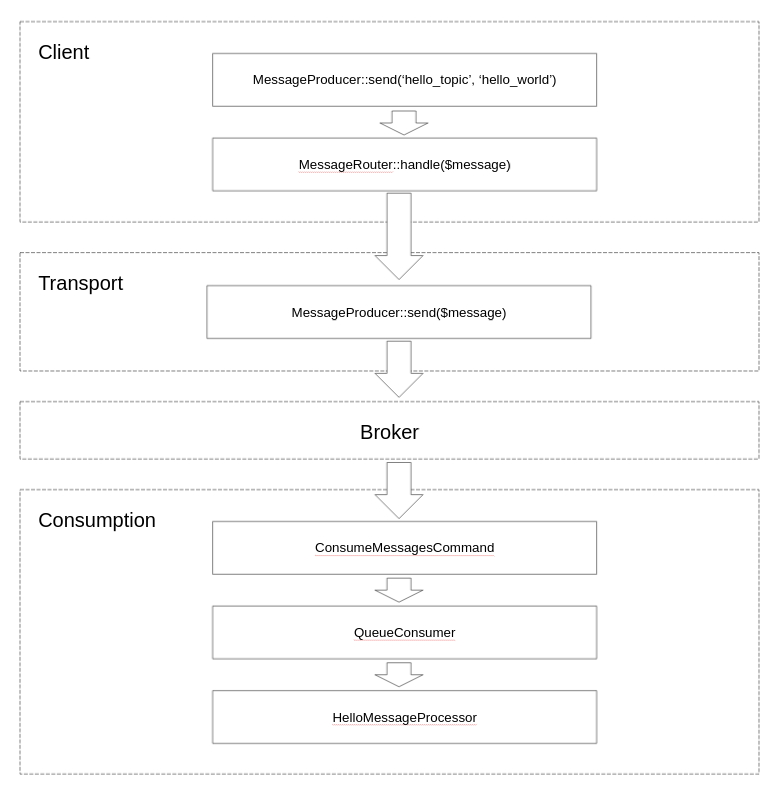
Transport — The transport API provides a common way for programs to create, send, receive and read messages. Inspired by Java Message Service.
MessageRouter — An implementation of RecipientList pattern.
Consumption — Provides tools to simplify message consumption: a CLI command, a queue consumer, a message processor, and ways to extend them.
Client — Provides a high-level, easy-to-use abstraction for producing and processing messages. It also reduces the need to configure a broker.

Flow
It takes the message and copies it for every queue the message should be sent to. It then forwards each message to the message queue driver, which sends it using a transport message producer.
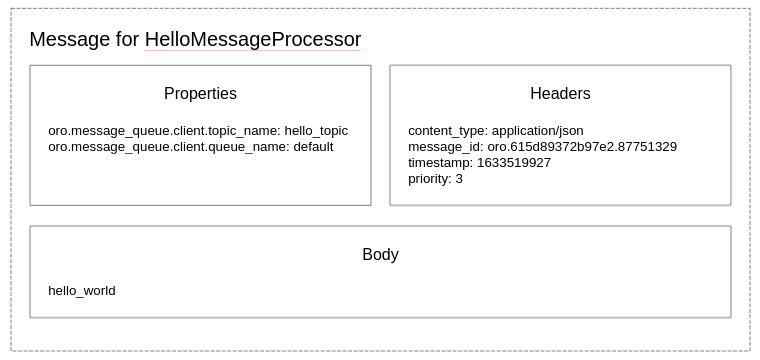
The message itself has headers and body, and they change this way while traveling through the system:
Key Classes
MessageProducer - The client’s message producer that sends messages
MessageProcessorInterface - Each class that does the job has to implement this interface
TopicSubscriberInterface - Similar to EventSubscriberInterface. It lets you keep the processing code and the topics it subscribes to in one place.
ConsumeMessagesCommand - A command you use to consume messages.
QueueConsumer - A class that runs inside the command, watches for a new message, and passes it to the message processor once it arrives.
Message Processors
Message Settings
Topic — Refers to the term ‘Message Topic’ above.
Body — A string or an array with some data.
Priority — Can be
MessagePriority::VERY_LOW,MessagePriority::LOW,MessagePriority::NORMAL,MessagePriority::HIGH,MessagePriority::VERY_HIGH. Recognizing priority is simple: there are five queues, one queue per priority. Consumers process messages from the VERY_HIGH queue. If there are no messages in the VERY_HIGH queue, consumers process messages from the HIGH queue, etc. Consequently, if all other queues are empty, the consumer processes messages from the VERY_LOW queue.Expire — The number of seconds after which the message should be removed from the queue without processing.
Delay — The number of seconds the message should be delayed for before it is sent to a queue.
Message Processors
Message Processors are classes that process queue messages. They implement MessageProcessorInterface. In addition, they usually subscribe to specific topics and implement TopicSubscriberInterface.
The process(MessageInterface $message, SessionInterface $session) method describes the actions that should be performed when a message is received. It can perform the actions directly or create a job. It can also produce a new message to run another processor asynchronously.
Processing Status
The received message can be processed, rejected, and re-queued. An exception can also be thrown.
Message Processor will return ``self::ACK`` in the following cases:
If a message was processed successfully.
If the created job returned
true.
It means that the message was processed successfully and is removed from the queue.
Message Processor will return ``self::REJECT`` in the following cases:
If a message is broken.
If the created job returned
false.
It means that the message was not processed and is removed from the queue because it is unprocessable and will never become processable (e.g., a required parameter is missing or another permanent error appears).
There could be two options:
The message became unprocessable as a result of routine work. For example, when the message was sent to the entity that existed at the moment of sending but was at some point deleted. The entity will not appear again, and we can reject the message. As it is a typical workflow, user intervention is not required.
The message became unprocessable due to a failure. For example, when an entity id was invalid or missing. This is abnormal behavior, the message should also be rejected, but the processor requires user attention (e.g., log a critical error or even throw an exception).
If a message cannot be processed temporarily, for example, in case of connection timeout due to server overload, the process method should return self::REQUEUE. The message will be returned to the queue again and will be processed later. This will also happen if an exception is thrown during processing or job running.
The workflow of re-queuing messages (processor returns ``self::REQUEUE``) is the following:
A consumer processes a message (runs the
processmethod of the message processor).The
processmethod returnsself::REQUEUE.The consumer puts the message (i.e., a copy of the message) to the end of the queue setting the
redeliveryflag to true.The consumer continues message processing (the requeued message is at the end of the queue).
When the turn of the requeued message comes, the
RedeliveryMessageExtensionworks and sets a delay for the requeued message.The time set in the delay passes, and the message is processed again.
The workflow of re-queuing messages when an exception is thrown inside a message processor is slightly different:
A consumer processes a message (runs
processmethod of the message processor).An exception is thrown inside the
processmethod.The consumer logs the exception and puts the message (i.e., a copy of the message) to the end of the queue setting the
redeliveryflag to true. Then the consumer fails with the exception.The consumer needs to be re-run at this stage, either manually or automatically with Supervisord. A manual re-run is preferred for development, since developers should review the exceptions thrown during message processing. An automatic re-run is preferred for regression testing or prod.
The consumer continues message processing (the failing message is at the end of the queue).
When the turn of the failing message comes, the
RedeliveryMessageExtensionworks and sets a delay for the failing message.After the delay time passes, the message is processed again and the consumer can fail again.
Message Flow
Simple Flow
Usually, the message flow looks the following way:

However, the flow becomes more complicated if more than one processor subscribes to the same topic. The client’s message producer sends a message to a router message processor. The router finds the current recipients interested in that message and sends each of them a copy. Each target message processor then takes its copy of the message and processes it.
Simple Way to Run Several Processes in Parallel
Suppose we want to run two processes in parallel. We create Processor B for the first process and Processor C for the second. We then create Processor A, inject the Message Producer into it, and send messages to Processor B and Processor C. The messages are put in the queue, and when their turn comes, the consumers run processes B and C — possibly in parallel.

First, declare the MQ topic by creating a class that implements Oro\Component\MessageQueue\Topic\TopicInterface. Then, register it as a service with the tag oro_message_queue.topic. For more details, see the Message Queue Topics.
 class SampleTopic extends AbstractTopic
 {
     public static function getName(): string
     {
         return 'oro.message_queue.sample_topic';
     }

     public static function getDescription(): string
     {
         return 'Sample topic description';
     }

     public function configureMessageBody(OptionsResolver $resolver): void
     {
         $resolver
             ->setRequired('sample_key')
             ->setAllowedTypes('sample_key', 'string');
     }
 }
 services:
     _defaults:
         tags:
             - { name: oro_message_queue.topic }

     Oro\Bundle\SampleBundle\Async\Topic\SampleTopic: ~
Once you configured everything, you can start producing messages:
/** @var Oro\Component\MessageQueue\Client\MessageProducer $messageProducer **/
$messageProducer = $container->get('oro_message_queue.message_producer');

$messageProducer->send(SampleTopic::getName(), ['sample_key' => 'sample_value']);
To consume messages, first, create a message processor:
use Oro\Bundle\SampleBundle\Async\Topic\SampleTopic;
use Oro\Component\MessageQueue\Consumption\MessageProcessor;

class FooMessageProcessor implements MessageProcessor, TopicSubscriberInterface
{
    public function process(Message $message, Session $session): string
    {
        echo $message->getBody()['sample_key'];

        return self::ACK;
        // return self::REJECT; // when the message is broken
        // return self::REQUEUE; // the message is fine but you want to postpone processing
    }

    public static function getSubscribedTopics(): array
    {
        return SampleTopic::getName();
    }
}
Register it as a container service and subscribe to the topic:
oro_channel.async.change_integration_status_processor:
    class: FooMessageProcessor
    tags:
        - { name: 'oro_message_queue.client.message_processor' }
Code example:
public function process(MessageInterface $message, SessionInterface $session)
{
    $data = $message->getBody();

    foreach ($data['ids'] as $id) {
        $this->producer->send(DoSomethingWithEntity::getName(), [
            'id' => $id,
            'targetClass' => $data['targetClass'],
            'targetId' => $data['targetId'],
        ]);
    }

    $this->logger->info(sprintf(
        'Sent "%s" messages',
        count($data['ids'])
    ));

    return self::ACK;
}
The processor in this example accepts an array of entity ids and sends a DoSomethingWithEntity message for each id. The messages are put in the message queue and processed when their turn comes — in parallel if several consumers are running.
This approach is simple and works well, but it has a few flaws.
We do not have a way to monitor the status of processes except for reading log files. In the example above, we do not know how many entities are being processed and how many are still in the queue. We also do not know how many entities were processed successfully and how many received errors during the processing.
We cannot ensure the unique run.
We cannot easily interrupt the running processes.
Usage
The following is an example of a message production using only a transport layer:
use Oro\Component\MessageQueue\Transport\Dbal\DbalConnection;
use Doctrine\DBAL\Configuration;
use Doctrine\DBAL\DriverManager;

$doctrineConnection = DriverManager::getConnection(
    ['url' => 'postgresql://user:secret@localhost/mydb'],
    new Configuration
);

$connection = new DbalConnection($doctrineConnection, 'oro_message_queue');

$session = $connection->createSession();

$queue = $session->createQueue('aQueue');
$message = $session->createMessage('Something has happened');

$session->createProducer()->send($queue, $message);

$session->close();
$connection->close();
The following is an example of a message consuming using only a transport layer:
use Oro\Component\MessageQueue\Transport\Dbal\DbalConnection;
use Doctrine\DBAL\Configuration;
use Doctrine\DBAL\DriverManager;

$doctrineConnection = DriverManager::getConnection(
    ['url' => 'postgresql://user:secret@localhost/mydb'],
    new Configuration
);

$connection = new DbalConnection($doctrineConnection, 'oro_message_queue');

$session = $connection->createSession();

$queue = $session->createQueue('aQueue');
$consumer = $session->createConsumer($queue);

while (true) {
    if ($message = $consumer->receive()) {
        echo $message->getBody();

        $consumer->acknowledge($message);
    }
}

$session->close();
$connection->close();
The following is an example of a message consuming using a consumption layer:
use Oro\Component\MessageQueue\Consumption\MessageProcessor;

class FooMessageProcessor implements MessageProcessor
{
    public function process(Message $message, Session $session)
    {
        echo $message->getBody();

        return self::ACK;
    }
}
use Doctrine\DBAL\Configuration;
use Doctrine\DBAL\DriverManager;
use Oro\Component\MessageQueue\Consumption\ChainExtension;
use Oro\Component\MessageQueue\Consumption\QueueConsumer;
use Oro\Component\MessageQueue\Transport\Dbal\DbalConnection;

$doctrineConnection = DriverManager::getConnection(
    ['url' => 'postgresql://user:secret@localhost/mydb'],
    new Configuration
);

$connection = new DbalConnection($doctrineConnection, 'oro_message_queue');

$queueConsumer = new QueueConsumer($connection, new ChainExtension([]));
$queueConsumer->bind('aQueue', new FooMessageProcessor());

try {
    $queueConsumer->consume();
} finally {
    $queueConsumer->getConnection()->close();
}
Example
A processor receives a message with the entity id. It finds the entity and changes its status without creating any job.
#[\Override]
public function process(MessageInterface $message, SessionInterface $session)
{
    $body = $message->getBody();

    if (! isset($body['id'])) {
        $this->logger->critical(
            sprintf('Got invalid message, id is empty: "%s"', $message->getBody()),
            ['message' => $message]
        );

        return self::REJECT;
    }

    $em = $this->getEntityManager();
    $repository = $em->getRepository(SomeEntity::class);

    $entity = $repository->find($body['id']);

    if(! $entity) {
        $this->logger->error(
            sprintf('Cannot find an entity with id: "%s"', $body['id']),
            ['message' => $message]
        );

        return self::REJECT;
    }

    $entity->setStatus('success');
    $em->persist($entity);
    $em->flush();

    return self::ACK;
  }
Overall, there can be three cases:
The processor received a message with an entity id. The entity was found. The process method of the processor changed the entity status and returned self::ACK.
The processor received a message with an entity id. The entity was not found. This is possible if the entity was deleted while the message was in the queue (i.e., after it was sent but before it was processed). This is expected behavior, but the processor rejects the message because the entity does not exist and will not appear later. Note that we use an error logging level.
The processor received a message with an empty entity id. This is unexpected behavior. There are bugs in the code that sent the message. We also reject the message but use critical logging to inform that user intervention is required.
See Also