Reports & Segments
Reports
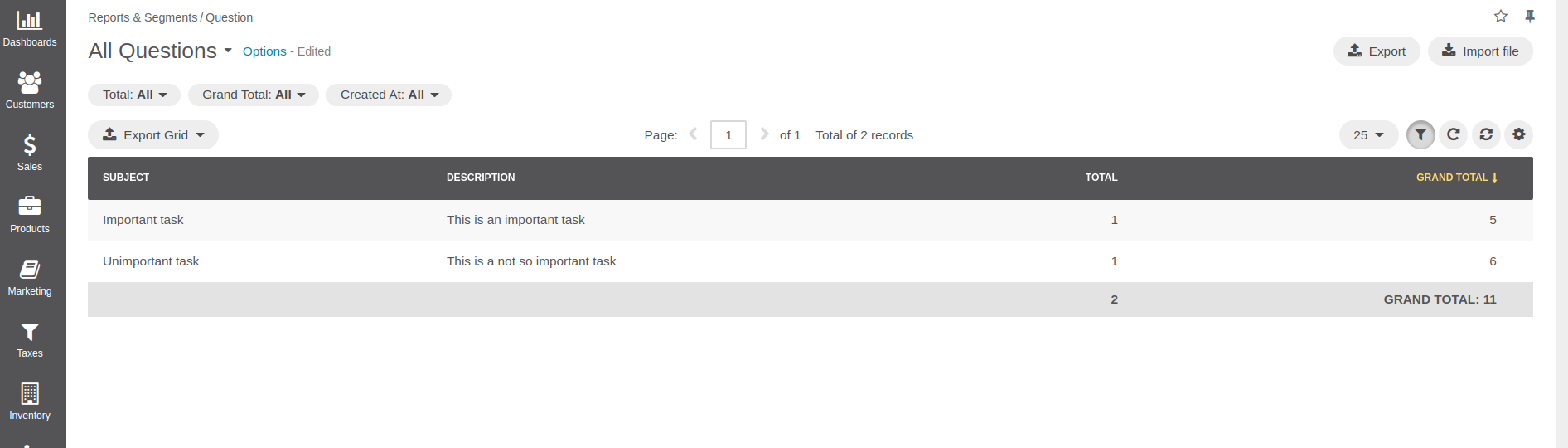
OroPlatform lets you create customized reports about the entities in your application. For example, you can create a report that displays the achieved accounts by opportunity:
See also
You can also configure reports via the web UI.
Configure a Report
Building a new report follows the same process as defining a data grid. A data grid is a YAML configuration
that lives in a datagrids.yml file: in your bundle’s Resources/config/oro directory for the backend datagrid,
and in Resources/views/layouts/<theme>/config/datagrids.yml for the frontend datagrid. For example:
datagrids:
    acme-demo-question-report:
        pageTitle: acme.demo.question.page_title
        source:
            type: orm
            acl_resource: oro_report_view
            query:
                select:
                    - SUM(o.id) as value
                    - COUNT(o.id) as total
                    - o.subject
                    - o.description
                groupBy: o.dueDate
                from:
                    - { table: Acme\Bundle\DemoBundle\Entity\Question, alias: o }
        properties:
            subject: ~
            description: ~
        totals:
            total:
                extends: grand_total
                per_page: true
                hide_if_one_page: true
                columns:
                    total:
                        label: acme.demo.question.total
            grand_total:
                columns:
                    total:
                        expr: COUNT( o.id )
                    value:
                        label: acme.demo.question.grand_total
                        expr: SUM( o.id )
                        formatter: number

        columns:
            subject: { label: acme.demo.question.subject.label }
            description: { label: acme.demo.question.description.label }
            total: { label: acme.demo.question.total, frontend_type: integer }
            value: { label: acme.demo.question.grand_total, frontend_type: number }
        sorters:
            columns:
                subject: { data_name: subject }
                description: { data_name: description }
                total: { data_name: total }
                value: { data_name: value }
        filters:
            columns:
                total:
                    type: number
                    data_name: total
                    filter_by_having: true
                value:
                    type: number
                    data_name: value
                    filter_by_having: true
                createdAt:
                    type: date
                    label: oro.ui.created_at
                    data_name: o.createdAt
        options:
            entityHint: report data
            export: true
The definition of a data grid consists of the following sections:
pageTitle
The report headline, you can use labels for translations here.
source
The
sourceproperty describes which data need to be fetched from the database to collect all data needed for the report. As you can see, you can use all the features you already know from the Doctrine query builder. Theacl_resourcespecifies the ACL a user has to fulfill to be able to access the data grid.See also
You can learn more about other data source types and how to implement your own adapter in the datasource documentation.
totals
Here you configure which columns display total values for the currently shown page (
total) and for all existing entries (grand_total). You can also specify custom expressions to calculate the value shown (for example, to display the total revenue, all existing values are summed up).
columns
The
columnsoption configures which columns will be visible in the data grid. As you can see, you can either refer to values that are produced by thesource(likecntorvalue) or to a kind of virtual column (likeperiod), which can be defined through customfilters(see below).
sorters
This option configures which columns can be used to sort entries by the time they are displayed. You can refer to the
columnsthat you defined before.
filters
The
filtersoption provides the user interface to filter the report down to a subset of the available entries. In the example above, theperiodcolumn lets the user select from a list which period to show. The available choices refer directly to the fields selected with thesourceconfiguration. If the user does not choose thedefaultoption,monthPeriodis used by default:default: period: { value: monthPeriod }The
filter_by_havingoption, used for thecntandvaluecolumns, filters for entries that exactly match the value entered by the user. For thecloseDateandcreatedAtcolumns, the user gets a date widget to select an interval that narrows the set of entries shown.
options
Additional options that describe how the report will be presented. In the example above, reports will be exportable.
See also
This example is taken from ReportBundle, which is part of OroPlatform. Refer to it for more examples.
You can also find more information on data grids in the DataGridBundle documentation.
Access the Report
To access the new report, add a custom item to the Reports & Segments menu in the
navigation.yml configuration file, located in the Resources/config directory of your bundle:
navigation:
    menu_config:
        items:
            acme_demo_questions_report:
                label: acme.demo.question.entity_label
                route: acme_demo_question_report
                route_parameters:
                    reportGroupName: questions
                    reportName: question_report
            acme_demo_doctrine_type_field_list:
                label: acme.demo.doctrinetypefield.entity_plural_label
                route: acme_demo_doctrine_type_field_index
                extras:
                    routes:
                        - acme_demo_doctrine_type_field_index
                        - acme_demo_doctrine_type_field_view
            shortcut_acme_demo_doctrine_type_field_create:
The configuration of your new menu items is grouped under the oro_menu_config key.
First, under the items key, you create a new menu item shown in the backend as Accounts by Opportunity. The reportGroupName and reportName options in the route_parameters select the report to show; they refer to the report name configured in the example above. You can add more items if you have more custom reports.
Then, under the tree key you add the newly created item to the Reports & Segments tab of the application menu.
Segments
A segment represents a dataset based on an entity and a set of filters. It is filtered data of the provided entity type.
There are two types of segments:
Static (is also called
On demand)Dynamic
The difference is that a dynamic segment displays real-time data, while a static segment stores a set of snapshots.
A static segment filters data the same way as a dynamic one, but stores the state in a service table (oro_segment_snapshot). It is a snapshot of the filtered data at a point in time. So, even if the data no longer matches the filtering criteria in real time, it still remains in the static segment’s dataset.
Also, both segment types have a table representation of data. It can be configured from the segment management pages.
Frontend Implementation
The frontend part of segment management is based on the condition builder from OroQueryDesignerBundle. See the Condition Builder Component topic for more details.
A segmentation filter derives from AbstractFilter of OroFilterBundle and provides the ajax-based autocomplete field, which in turn is based on the JQuery.Select2 plugin.
Backend Implementation
Entities
The Segment entity descends from the AbstractQueryDesigner model in OroQueryDesignerBundle. It contains an entity name (based on), a JSON-encoded definition, and service fields such as created/updated, owner, and so on.
SegmentType represents the possible segment types. The data fixture migration mechanism loads the default types.
SegmentSnapshot is a service entity that holds snapshot data for static segments: a link to the segment it belongs to, the entityId field linked to the entity of the type the segment is based on, and the date the link was created.
Query Builders
As described above, static and dynamic segments apply their filtering differently. Two strategies handle this: the DynamicSegmentQueryBuilder and the StaticSegmentQueryBuilder respectively.
Datagrid
For a table representation of the segment, use OroDataGridBundle. The grid configuration comes from the segment definition in Oro\Bundle\SegmentBundle\Grid\ConfigurationProvider. It retrieves the segment identifier from the grid name and passes the loaded segment entity to SegmentDatagridConfigurationBuilder.
The datagrid configuration does not process filtering, so that the filtering logic stays encapsulated in SegmentFilter. Two proxy classes serve this purpose: SegmentDatagridConfigurationQueryDesigner and DynamicSegmentQueryDesigner.
SegmentDatagridConfigurationQueryDesigner provides the definition to the segment filter only, so the datagrid configuration builder receives the definition for the segment filter.
SegmentQueryConverter uses DynamicSegmentQueryDesigner to skip converting the column definitions, because the query builder needs only one field in the SELECT statement: the entity identifier.
Usage Examples
The query is retrieved using the following code:
if ($segment->getType()->getName() === SegmentType::TYPE_DYNAMIC) {
    $query = $this->dynamicSegmentQueryBuilder->build($segment);
} else {
    $query = $this->staticSegmentQueryBuilder->build($segment);
}
The $query variable contains an instance of \Doctrine\ORM\Query. Add it to the statement of any Doctrine query as follows:
/** @var EntityManger $em */
$classMetadata = $em->getClassMetadata($segment->getEntity());
$identifiers   = $classMetadata->getIdentifier();

// SOME QUERY HERE
$qb = $em->createQueryBuilder()->select()
    ->from($segment->getEntity());

$alias = 'u';
// only not composite identifiers are supported
$identifier = sprintf('%s.%s', $alias, reset($identifiers));
$expr       = $qb->expr()->in($identifier, $query->getDQL());

$qb->where($expr);

$params = $query->getParameters();
/** @var Parameter $param */
foreach ($params as $param) {
    $qb->setParameter($param->getName(), $param->getValue(), $param->getType());
}