Localization
Localization is the process of translating and adapting a product for a specific country or region. OroPlatform lets you customize the format of date/time/datetime, numeric and percent values, monetary values, and names and addresses.
System Configuration
To define localization parameters, navigate to the System > Configuration > General Setup > Localization menu in the system configuration.
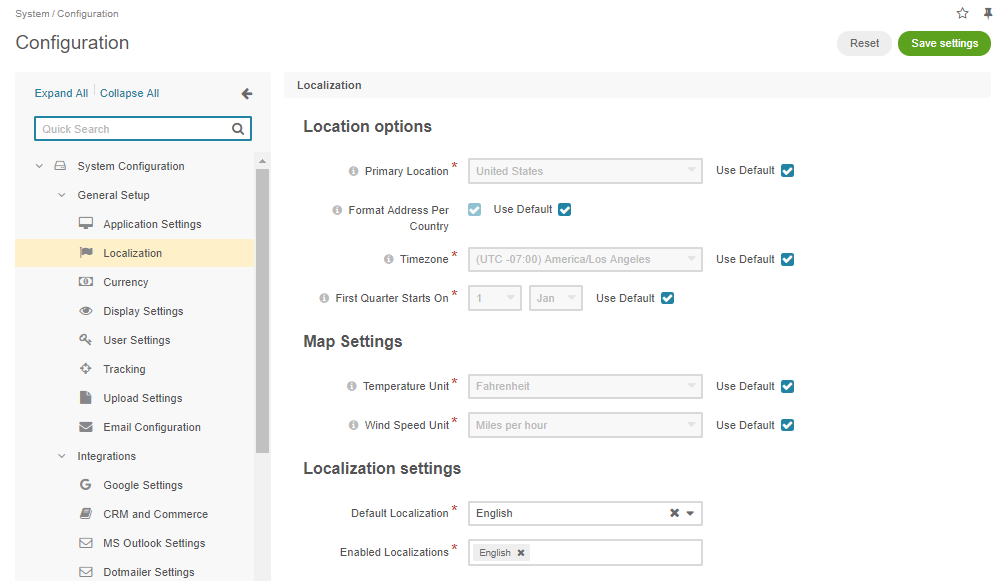
Primary Location — usually refers to the current country and is used to define appropriate address formats and the default currency.
Format Address per country — a flag that defines whether the address should be formatted according to its country’s rules or if the application’s primary location should be used instead.
Timezone — defines the timezone to render time and datetime values.
First Quarter Starts on — defines the first day of the first quarter. This value is used to generate proper reports.
Temperature Unit and Wind Speed Unit — used to render additional information on location maps.
Default Localization — specifies the default language of the back-office and storefront UI.
Enabled Localizations — provides a list of automatically generated localizations based on the data preconfigured under the System > Localization > Localizations in the back-office.
Configuration Files
Localization information is stored in configuration files. Each bundle can add its own localization information using appropriate files (each has to be stored in the bundle’s Resources/config/oro directory):
locale_data.yml
 US:
     currency_code: USD
     phone_prefix: '1'
     default_locale: en_US
 RU:
     currency_code: RUB
     phone_prefix: '7'
     default_locale: ru
This file contains the most basic information for countries (US and RU are country codes as defined by ISO 3166).
Each country configuration provides:
name_format.yml
 en: "%prefix% %first_name% %middle_name% %last_name% %suffix%"
 ru: "%last_name% %first_name% %middle_name%"
This file specifies a name format per locale. Allowed placeholders are:
%prefix%%prefix%%first_name%%middle_name%%last_name%%suffix%
address_format.yml
 US:
     format: "%name%\n%organization%\n%street%\n%CITY% %REGION_CODE% %COUNTRY_ISO2% %postal_code%"
 RU:
     format: "%postal_code% %COUNTRY% %CITY%\n%STREET%\n%organization%\n%name%"
This file specifies the name format for addresses and some additional address information optionally. Each placeholder can be lowercase (data will be rendered as is) or uppercase (data will be rendered in uppercase).
The allowed placeholders are:
%name%%street%%city%%country%%country_iso2%%country_iso3%%region%%region_name%%region_code%%postal_code%%organization%
Date and Numeric Formatting
The INTL library functions format both dates and numbers (decimal, percent, or currency). The library is therefore required, and formatting follows its installed version.
On the backend, the application provides formatter services that wrap the INTL library to format dates and numbers:
Oro\Bundle\LocaleBundle\Formatter\DateTimeFormatterformatDate()formatTime()format()
Oro\Bundle\LocaleBundle\Formatter\NumberFormatterformatDecimal()formatPercent()formatCurrency()formatSpellout()formatDuration()formatOrdinal()
You can use these formatter methods in twig templates as filters:
oro_format_dateoro_format_timeoro_format_datetimeoro_format_numberoro_format_currencyoro_format_decimaloro_format_percentoro_format_spelloutoro_format_durationoro_format_ordinal
For example, the following Twig template prints a formatted datetime and a formatted monetary value:
{{ entity.createdAt|oro_format_datetime }}
{{ item.value|oro_format_currency }}
If the current locale is en and the currency is USD, the template renders the following values:
May 28, 2014 1:40 PM
$5,103.00
The application also provides similar JavaScript formatters on the frontend, accessed through JS module aliases:
orolocale/js/formatter/datetime(datetime.js)formatDate(value)formatTime(value)formatDateTime(value)
orolocale/js/formatter/number(number.js)formatDecimal(value)formatInteger(value)formatPercent(value)formatCurrency(value)
Name Formatting
Some entities have names that require localization before rendering. This includes formatting the name parts according to a specified format (see name_format.yml).
On the backend, such an entity must implement the Oro\Bundle\LocaleBundle\Model\FullNameInterface. This interface contains methods to extract all parts of a name: the name prefix, first name, middle name, last name, and name suffix. When an entity defines only a subset of the full name, you can use separate interfaces for each name part instead.
On the backend, the Oro\Bundle\LocaleBundle\Formatter\NameFormatter::format method of the Oro\Bundle\LocaleBundle\Formatter\NameFormatter class handles formatting. It receives an entity and returns a string formatted according to the defined rules.
The same formatting can be used in twig templates using the oro_format_name filter:
{{ entity|oro_format_name }}
For the en locale, an entity implementing the FullNameInterface will be formatted like this:
Mr. John S Doe Jr.
On the frontend side, you can perform the same formatting with the orolocale/js/formatter/name JS module, located in Oro/Bundle/LocaleBundle/Resources/public/js/formatter/name.js. This module uses a similar format() method.
Address Formatting
Other entities may represent addresses that should be formatted appropriately when rendered. The application provides default address formats for several countries (see address_format.yml).
An address entity may also have person fields and implement the FullNameInterface interface. In that case, the name is rendered according to the country’s default locale and used in place of the corresponding placeholder.
To support formatting, an address entity should implement the Oro\Bundle\LocaleBundle\Model\AddressInterface which defines methods to retrieve all required address parts (street, city, region name/code, postal code, country name/ISO2/ISO3 and organization).
The backend formatter, Oro\Bundle\LocaleBundle\Formatter\AddressFormatter, provides a format() method that returns a string representation of an address that can include the default newline separators (\n).
To use this formatter in a template, use the oro_format_address filter:
{{ address|oro_format_address }}
When used with the USA, such an address will be rendered like in the example below:
Mr. Roy K Greenwell
Products Inc.
2413 Capitol Avenue
ROMNEY IN US 47981
As with other entities, the frontend provides a JavaScript formatter — the orolocale/js/formatter/address JS module. Located in the address.js file in the Locale bundle, it contains a format() method that behaves exactly like the backend formatter.
Updating Localization from CLI
Administrators can update the application’s language and formatting after installation using the oro:localization:update command:
bin/console oro:localization:update --formatting-code=<locale_code> --language=<locale_code> --env=prod
bin/console oro:translation:update --all --env=prod
For example, to switch the application to French localization and formatting, use:
bin/console oro:localization:update --formatting-code=fr_FR --language=fr_FR --env=prod
bin/console oro:translation:update --all --env=prod