Session Transfer
Note
The Session Transfer OAuth grant is available as of OroCommerce version 7.0.5.
Session Transfer is a custom OAuth grant that enables a trusted OAuth application to open an authenticated Oro browser session. The application exchanges an existing OAuth access token for a short-lived, one-time Session Transfer Token and directs the browser to the Session Transfer endpoint on the target Oro site.
The flow supports both back-office and storefront OAuth applications. It preserves the application type and organization of the source access token. For a storefront application, it also preserves the current website context.
Important
A browser session is not limited by the scopes of the source access token. The session receives the permissions of the resolved back-office or customer user. Enable Session Transfer only for trusted OAuth applications.
Session Transfer Flow
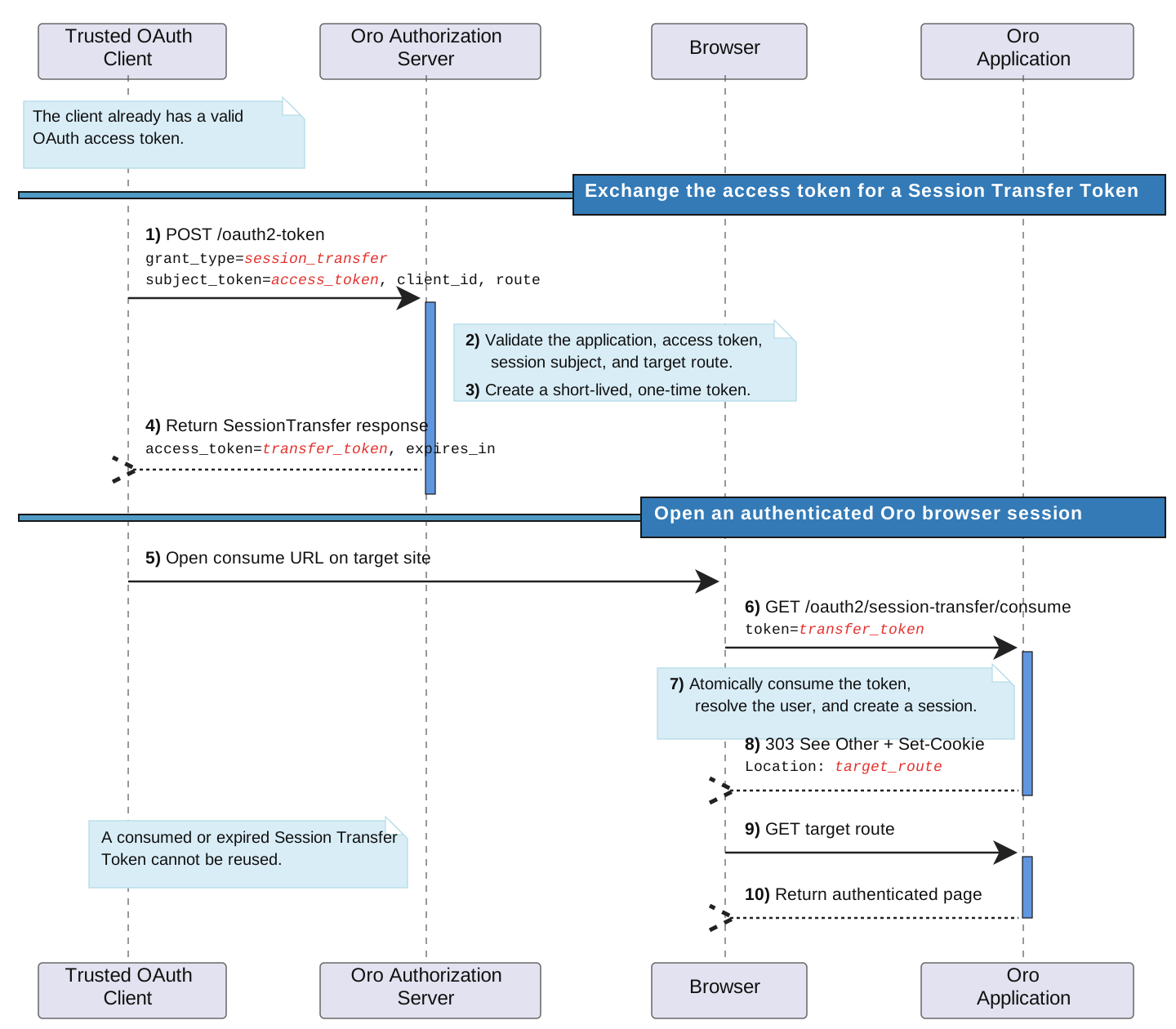
A client obtains an OAuth access token through one of the supported grants.
The client sends the access token to the
/oauth2-tokenendpoint using thesession_transfergrant.The authorization server returns a one-time Session Transfer Token.
The client opens the Session Transfer endpoint on the target Oro site and passes the token in its query string.
Oro consumes the token, creates a browser session, and redirects the browser to the requested route.
Configure an OAuth Application
Create or edit an OAuth application as described in Manage OAuth Applications or Manage Customer User OAuth Applications, and select Enable Session Transfer.
The OAuth application and its organization must remain active while the Session Transfer Token is issued and consumed. Disabling the application or clearing Enable Session Transfer invalidates unconsumed Session Transfer Tokens issued for the application.
Configure Token Lifetime
Session Transfer Tokens are valid for 60 seconds by default. Configure the lifetime in seconds under
oro_oauth2_server.authorization_server:
oro_oauth2_server:
    authorization_server:
        session_transfer_token_lifetime: 60
The value must be greater than zero. Keep the lifetime short because possession of a Session Transfer Token is sufficient to create the corresponding browser session.
Exchange an Access Token
Send a POST request to /oauth2-token with Content-Type: application/json and the following parameters:
grant_type— Must besession_transfer.client_id— The identifier of the OAuth application that issued the source access token.subject_token— A current OAuth access token that has not expired or been revoked.route— The name of the route where Oro redirects the browser after creating the session.route_parameters— An optional JSON object containing parameters required to generate the target route.
The source access token must belong to the same OAuth application and organization specified by client_id. The
request does not require client_secret because the source access token authorizes the exchange.
The following example creates a Session Transfer Token for a back-office application and redirects the browser to the current user’s profile:
POST /oauth2-token HTTP/1.1
Host: example.com
Content-Type: application/json

{
    "grant_type": "session_transfer",
    "client_id": "mobile-backoffice",
    "subject_token": "eyJ0eXAiOiJKV1QiLCJhbGciOiJSUzI1NiJ9...",
    "route": "oro_user_profile_view",
    "route_parameters": {}
}
For a storefront application, use a storefront route, for example
oro_customer_frontend_customer_user_profile. Do not use a storefront route with a back-office OAuth application
or a back-office route with a storefront OAuth application.
Session Transfer Token Response
The authorization server returns a response similar to the following:
{
    "token_type": "SessionTransfer",
    "access_token": "stt_3X4J5...",
    "expires_in": 60
}
The response contains the following properties:
token_type— AlwaysSessionTransfer.access_token— The one-time Session Transfer Token. It is not an OAuth API bearer token.expires_in— The number of seconds until the Session Transfer Token expires.
The response does not contain a consume URL because the /oauth2-token endpoint and the target browser session may
belong to different Oro sites. Build the URL using the origin of the target site and pass the URL-encoded token in the
token query parameter, for example:
https://target.example.com/oauth2/session-transfer/consume?token=stt_3X4J5...
Use a back-office target site for a back-office OAuth application and a storefront target site for a storefront OAuth
application. Open the URL immediately. After successful consumption, Oro responds with HTTP status 303 See Other
and redirects the browser to the requested route.
Resolve the Session Subject
For an access token issued through Authorization Code, Password, or Refresh Token grant, Session Transfer creates the browser session for the user represented by the access token.
For an access token issued through Client Credentials grant, Session Transfer creates the browser session for the owner of the OAuth application. A back-office application must be owned by a back-office user. A storefront application must be owned by a customer user.
The resolved user must be active and belong to the organization of the OAuth application. A storefront customer user must also match the organization of the current website.
Target Route Requirements
The target route must meet all of the following requirements:
It exists.
It accepts the
GETmethod.It belongs to the same back-office or storefront context as the OAuth application.
It is not one of the Session Transfer Token consumption routes.
Its route parameter names do not begin with an underscore.
Its route parameter values are scalar values or
null. A string value cannot exceed 2,048 characters.
Protect Session Transfer Tokens
Treat the Session Transfer Token and the consume URL that contains it as credentials:
Do not log, persist, cache, analyze, or share the token or URL.
Send the token URL only to the browser that should receive the session.
Use HTTPS for the token exchange and browser navigation.
Open the returned URL immediately because the token has a short lifetime.
Do not retry a consumed token. Request a new token instead.
The raw Session Transfer Token is returned only to the OAuth client. Oro stores its SHA-256 hash and atomically marks the token as consumed, so concurrent requests cannot use the same token more than once.
Clean Up Expired Tokens
The oro:cron:oauth-server:cleanup command removes expired Session Transfer Tokens together with other outdated OAuth
data. The command runs daily at midnight by default. See OAuth2ServerBundle CLI commands for details.