Important
You are browsing upcoming documentation for version 7.1 of OroCommerce, scheduled for release in 2027. Read the documentation for the latest LTS version to get up-to-date information.
See our Release Process documentation for more information on the currently supported and upcoming releases.
AI and Automation
Note
Please contact our support team to learn more about OroCommerce Enterprise AI features, discuss how they can meet your business needs, and get started with implementation.
Artificial Intelligence (AI) is rapidly transforming industries, and B2B eCommerce is no exception. In today’s highly competitive market, businesses need tools that enable smarter decision-making, improve operational efficiency, and provide exceptional customer experiences. OroCommerce is at the forefront of this transformation, introducing AI-powered tools such as OroIQ, AI Smart Agent, and AI Smart Order, tailored specifically to the complex needs of B2B eCommerce to help enhance business operations and customer experiences.
OroIQ
OroIQ introduces a unified way to interact with business data and workflows using natural language. Serving as a centralized back-office assistant, it provides a single entry point to AI capabilities across the platform. Instead of navigating multiple screens or complex menus, you can ask questions, explore data, and perform actions directly from a conversational interface. Because OroIQ is built directly on top of OroCommerce, it operates with full business context. It adheres to existing system logic and permission structures, ensuring that responses and actions are accurate, relevant, and secure.
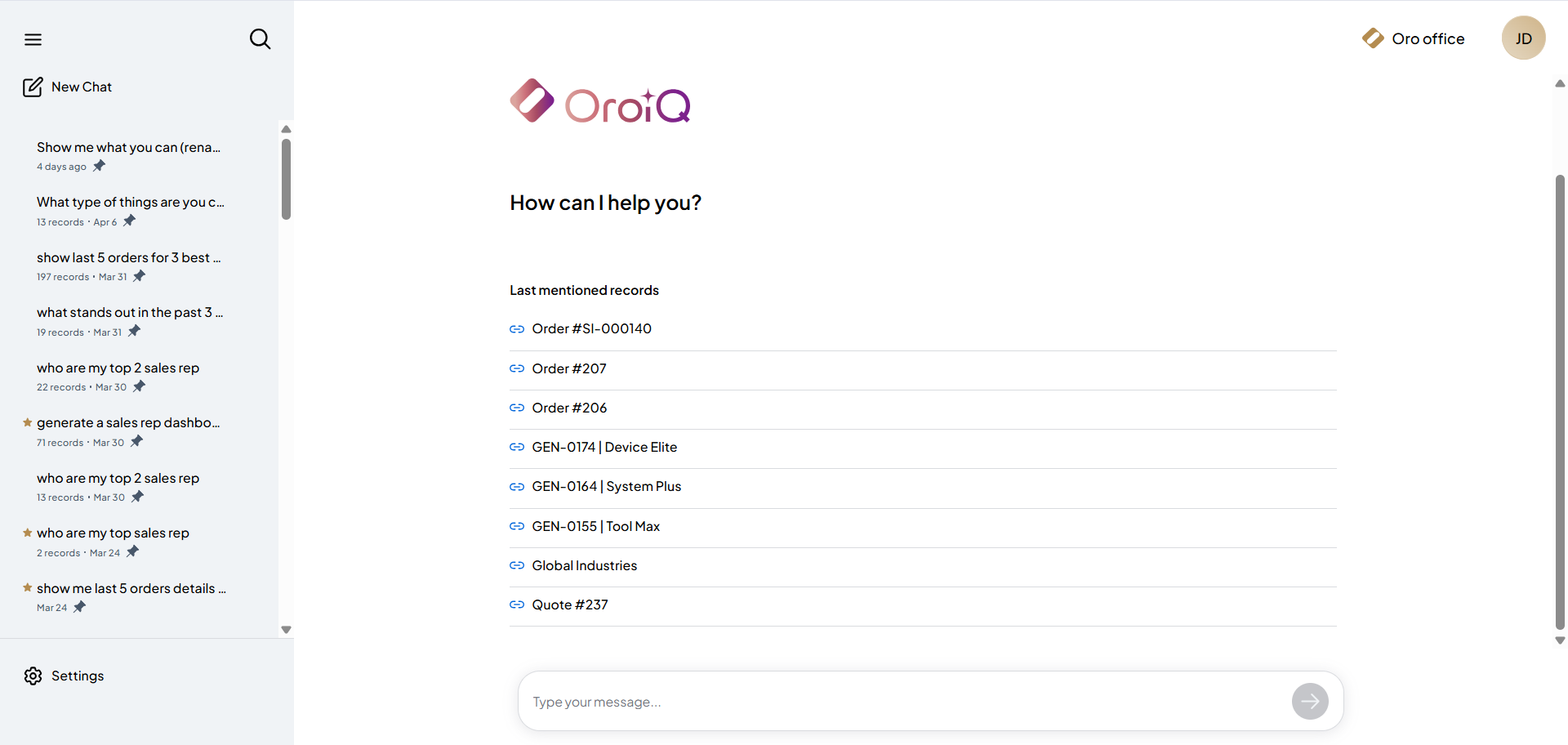
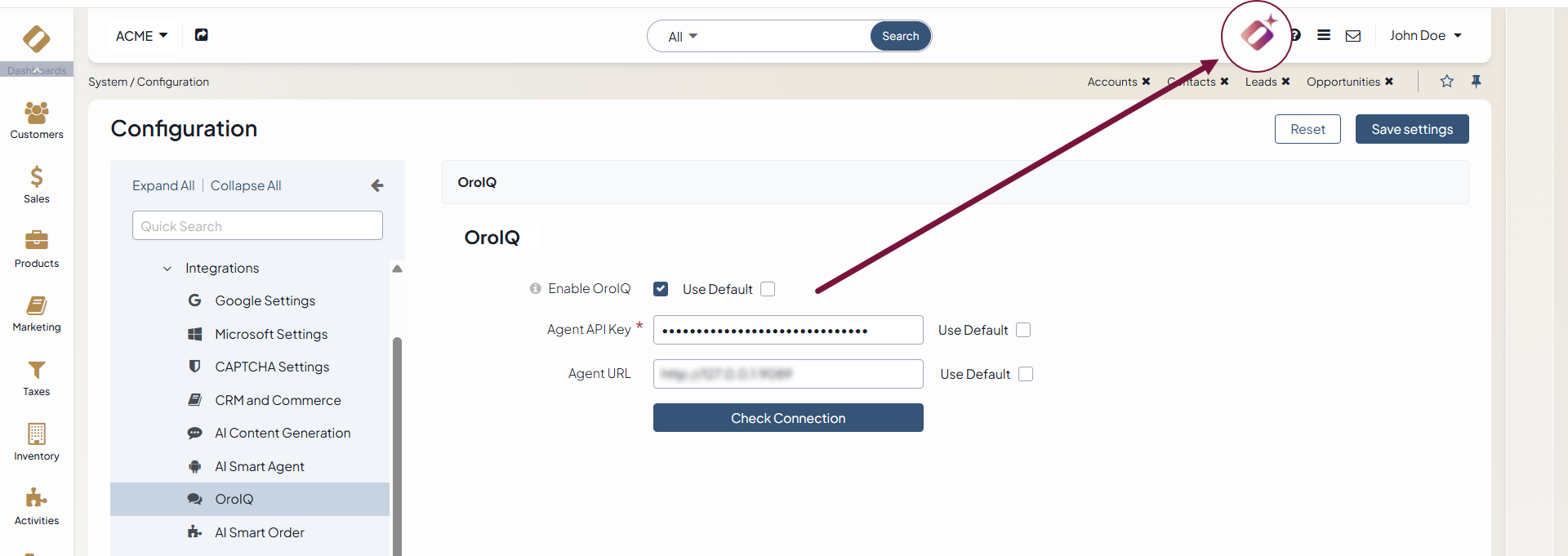
Once integrated and configured via the back-office by the Oro team, the assistant becomes accessible via the OroIQ icon in the top-right corner of the back-office. Opening it reveals a dedicated workspace where interactions are organized into conversational threads. Each thread automatically aggregates a collection of related records alongside the dialogue, giving you immediate access to the specific customers, orders, or quotes currently being discussed.
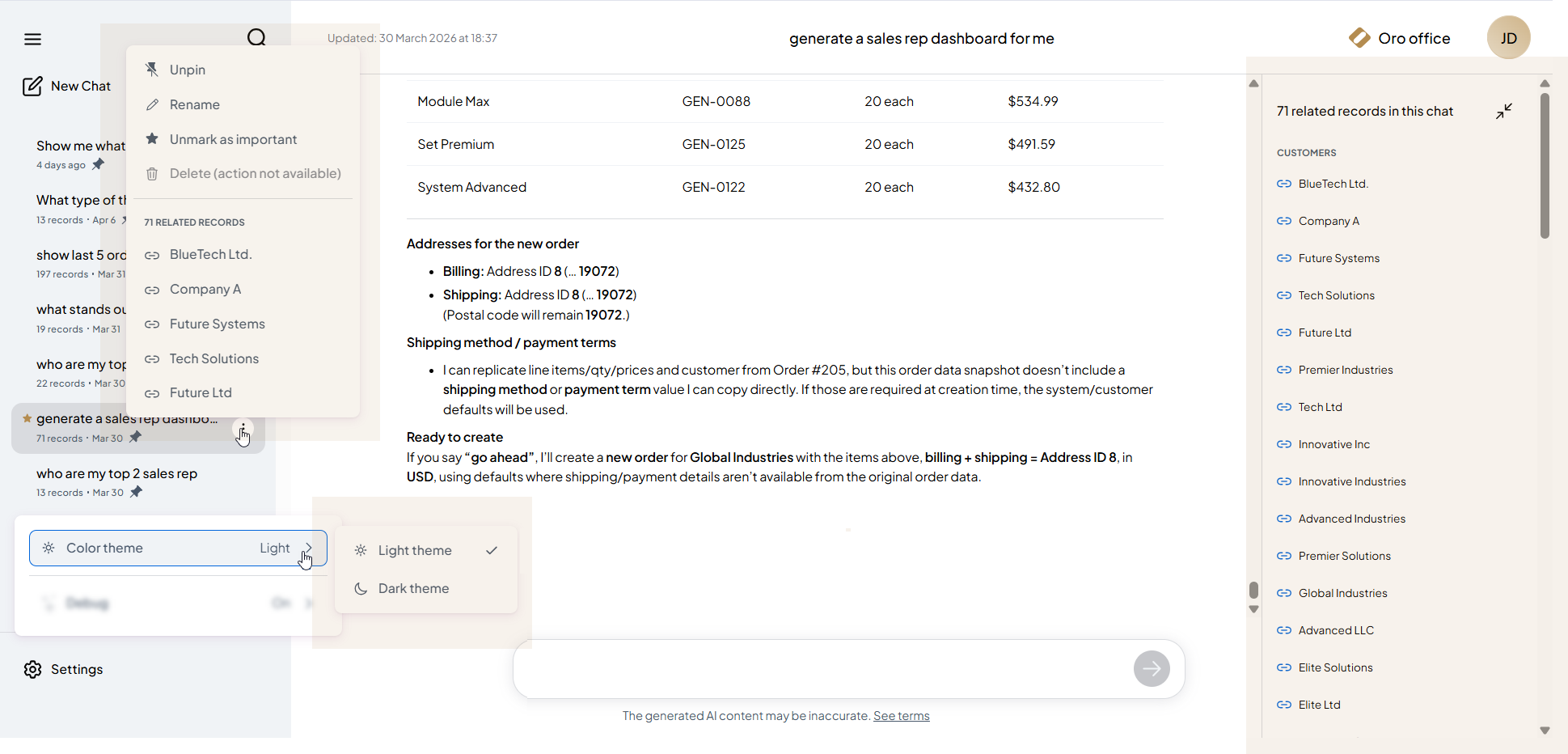
To help manage ongoing work, you can pin important conversations, search through past threads by title or content, and toggle a dark mode interface. To maintain a reliable audit trail, any thread that results in the creation of a system record is permanently preserved. These operational threads cannot be deleted, ensuring you always have the full historical context behind system actions.
OroIQ automatically determines the appropriate mode of engagement based on the nature of your query. Depending on whether you need to analyze information or execute a task, it intelligently switches between its two primary modes: Smart Insights and Smart Assistant.
Smart Insights
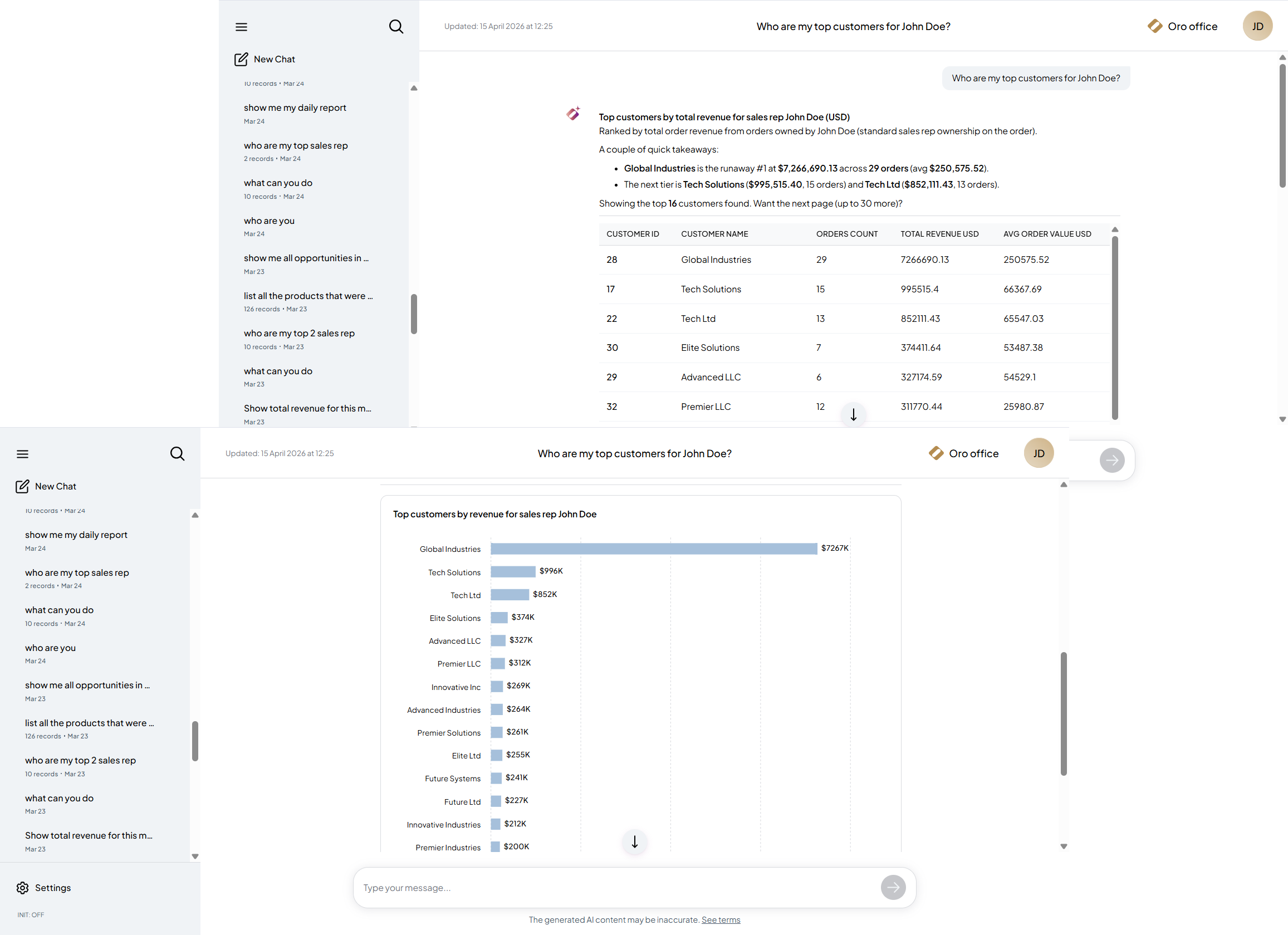
When a request requires data analysis, OroIQ engages Smart Insights. In this mode, it translates natural language questions into database queries, dynamically generating summaries, tables, and visualizations. This removes the need to manually configure reports. You can simply ask questions like “Who are the top customers for a specific account manager?” or “Show order trends by month,” and receive structured, ready-to-use answers directly in the chat.
Smart Insights capabilities are managed through OroCommerce entity management at both the entity and field level using the Include in Smart Insights option, controlling whether the entity and its selected fields to be queried by the assistant. Sensitive information, such as passwords, is excluded by default. However, custom entities and fields can be included as needed, allowing organizations to securely tailor the assistant’s analytical reach to their specific business requirements.
Smart Assistant
When a request involves taking action rather than just analyzing or viewing data, OroIQ transitions to the Smart Assistant. This mode allows you to execute business operations, such as creating quotes or orders, directly within the conversational interface.
For instance, you can instruct the assistant to draft a new quote with a fifteen percent discount, and then create an order from it. Before making any system changes, OroIQ prepares the requested action and presents a clear summary of what it intends to create or modify. It requires explicit confirmation to proceed and once granted, it executes the task and provides a direct link to the newly created record, allowing you to open the pre-filled form and continue your work from the back-office UI.
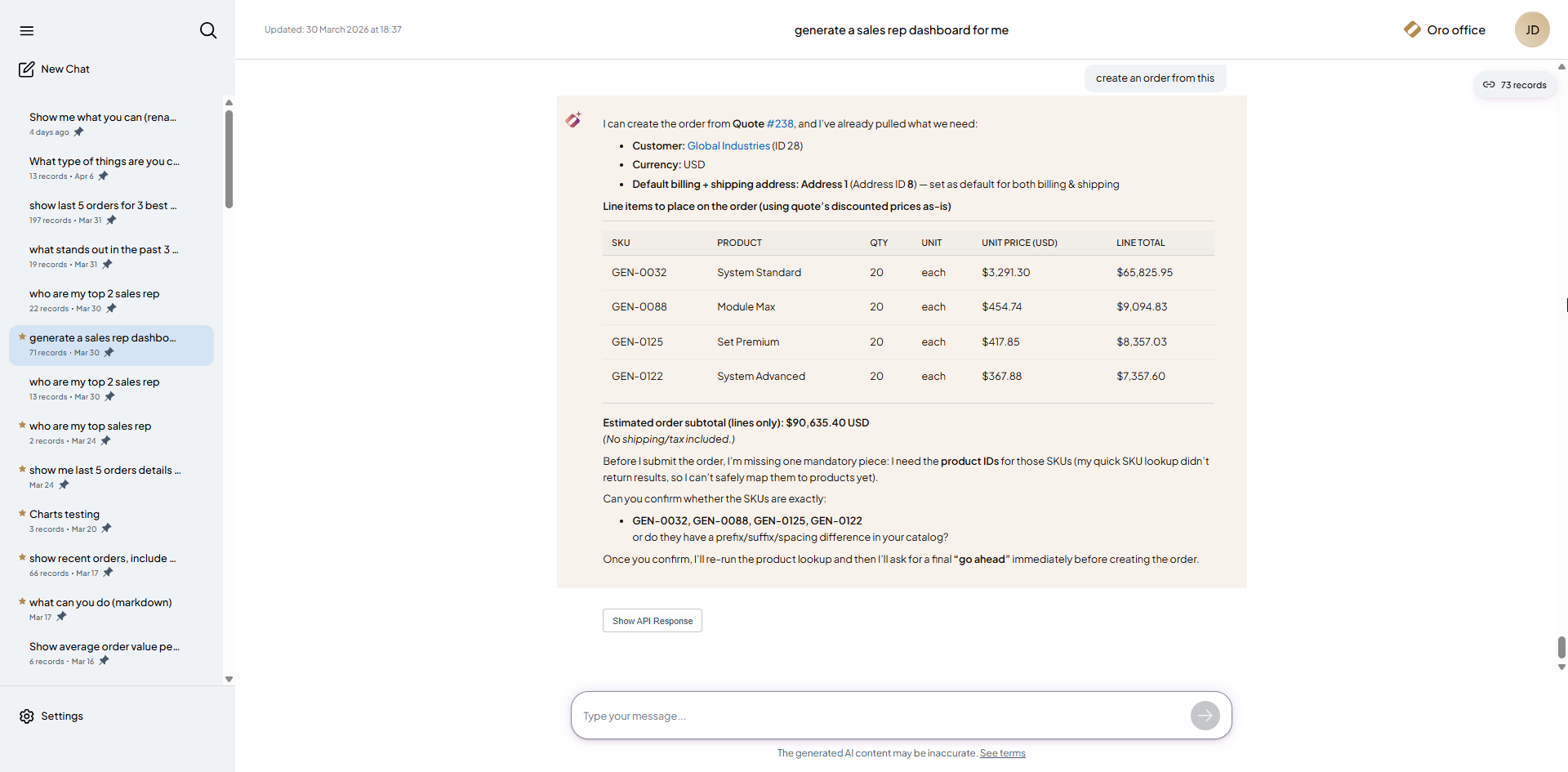
This confirmation step is a fundamental part of the OroIQ design. While it enables significant automation, it ensures that you remain in full control of all changes made to the system. Unlike standalone AI tools or generic language models, OroIQ operates strictly within the boundaries and permissions of OroCommerce. This allows it to generate reliable insights and safely execute actions without the security risks often associated with external AI systems.
Smart Agent
The Oro AI Smart Agent is an innovative virtual assistant designed to enhance and simplify the B2B buying experience in OroCommerce. Seamlessly integrated into the OroCommerce Enterprise storefront UI, this AI-powered assistant allows logged-in buyers to engage with the platform using natural spoken or written language, just as they would with a sales representative.
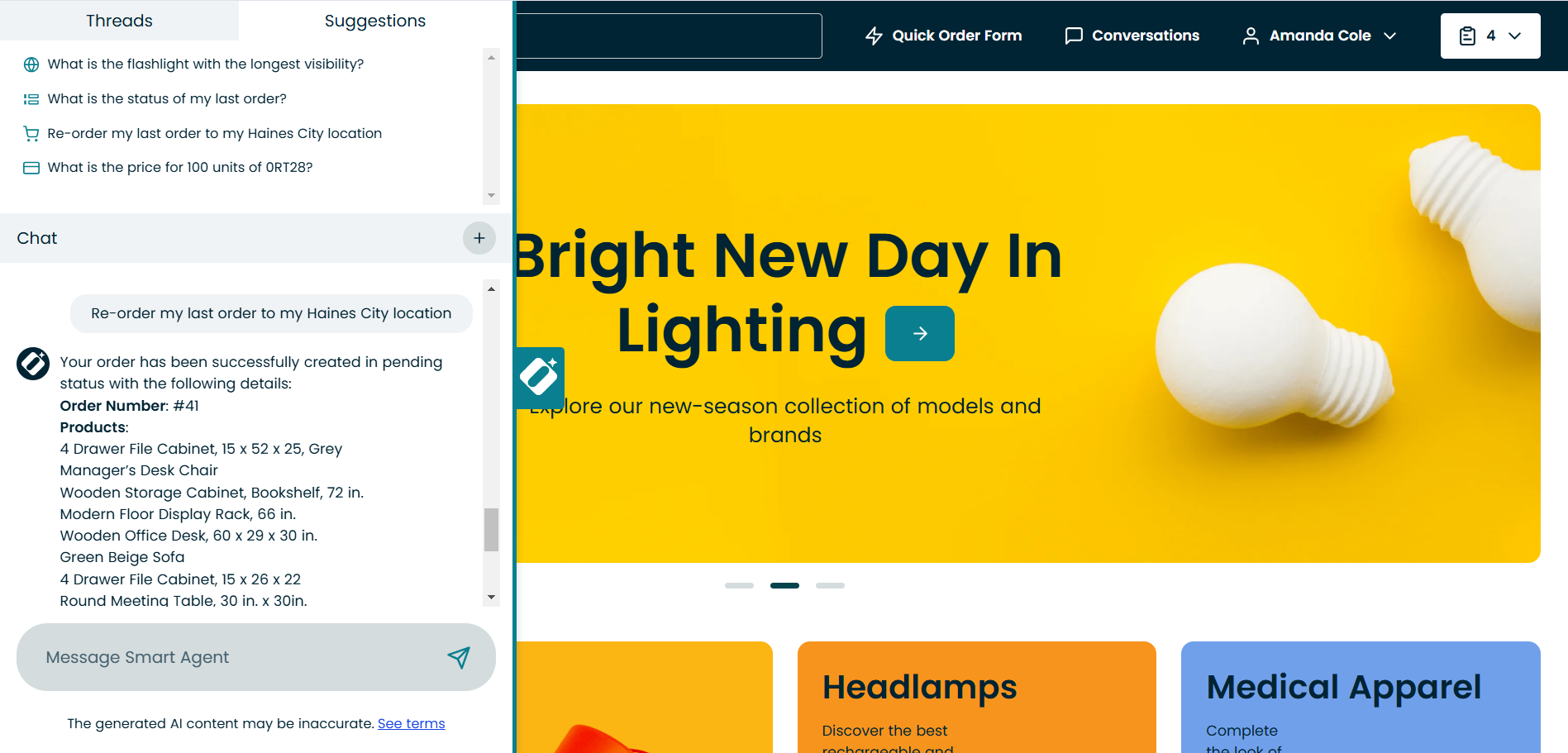
With the Oro AI Smart Agent, buyers can efficiently complete essential e-commerce tasks without requiring extensive training or technical expertise, such as:
Order Management – Create, update, and check order statuses.
Product Information – Find product details, pricing, inventory levels, and compare products.
Shopping Lists – Manage shopping lists, add products, and create orders from them.
And more.
The Smart Agent also supports multi-website environments. Responses, product data, and links are always generated for the specific website a buyer is currently using.
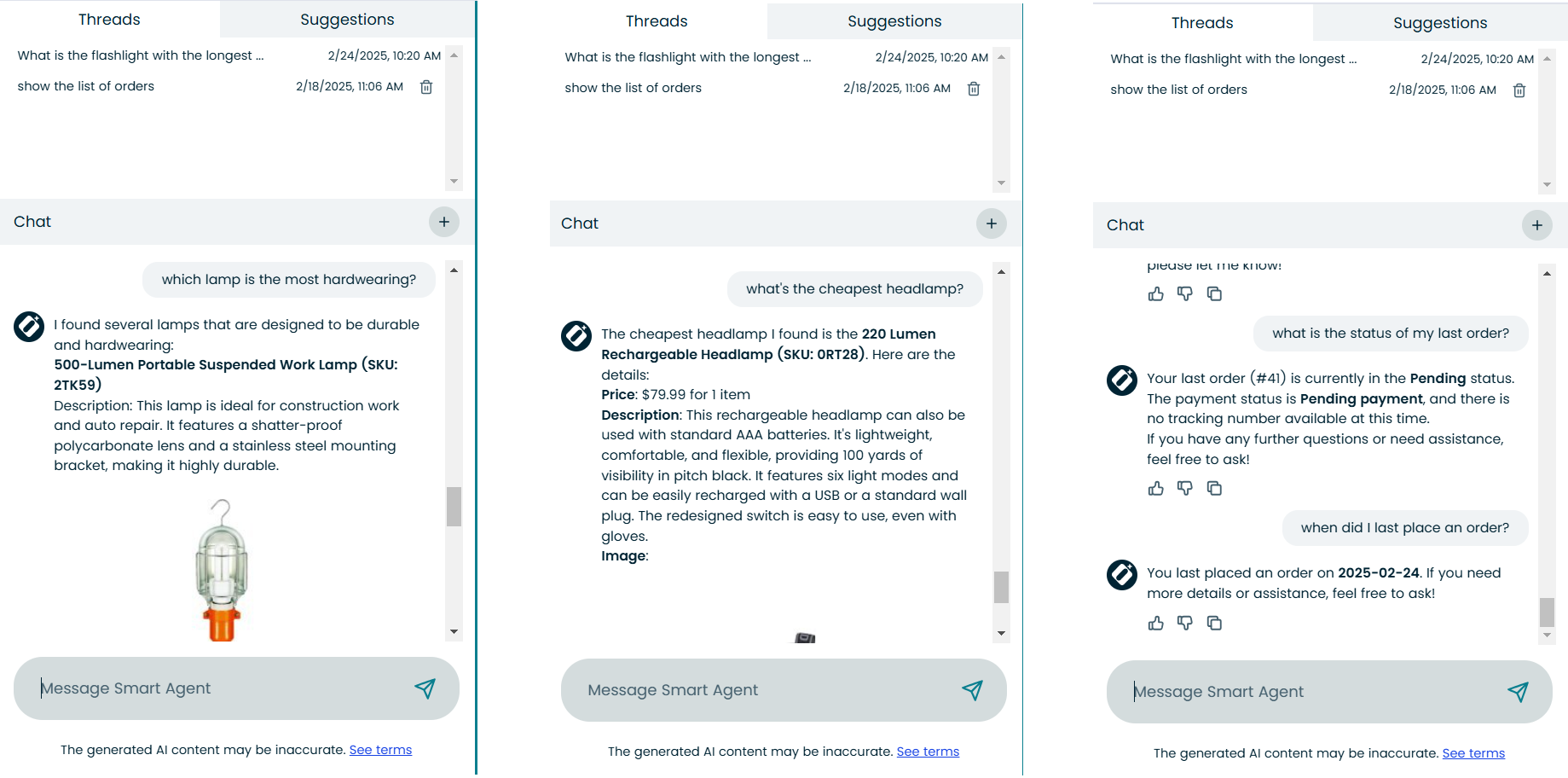
Once integrated by the Oro team and configured via the back-office, any logged-in buyer can access the Oro AI Smart Agent by clicking its icon in the storefront. The agent interface includes three sections:
Threads – Saves previous inquiries for reference.
Suggestions – Displays example questions and prompts to guide users.
Chat – Enables real-time interaction through messaging.
Beyond basic inquiries, the AI Smart Agent possesses reasoning capabilities, allowing it to handle complex requests and take actions similar to a sales representative. For instance, users can compare products by asking which is more durable or frequently purchased based on their order history. This functionality reduces operational overhead by minimizing the need for phone calls and emails, enabling buyers to handle their needs directly within the platform.
With its intuitive design and AI-driven efficiency, the Oro AI Smart Agent transforms B2B e-commerce interactions, making them smarter, faster, and more user-friendly.
Smart Order
The AI Smart Order tool modernizes and enhances the purchase order process for distributors and manufacturers, addressing inefficiencies caused by traditional methods like fax or email. In B2B commerce, many buyers still rely on these outdated processes, leading to manual data entry errors and delays. AI Smart Order eliminates these challenges by automating the capture and processing of purchase orders directly within OroCommerce, improving accuracy and operational efficiency.
Using advanced recognition technology, AI Smart Order adapts to any purchase order template or format, accurately capturing key details and validating them against existing system records. This ensures product information, pricing, and inventory levels are correct before processing, minimizing errors and reducing administrative workload. Businesses can save time, lower overhead costs, and focus on scaling operations without the burden of manual order entry.
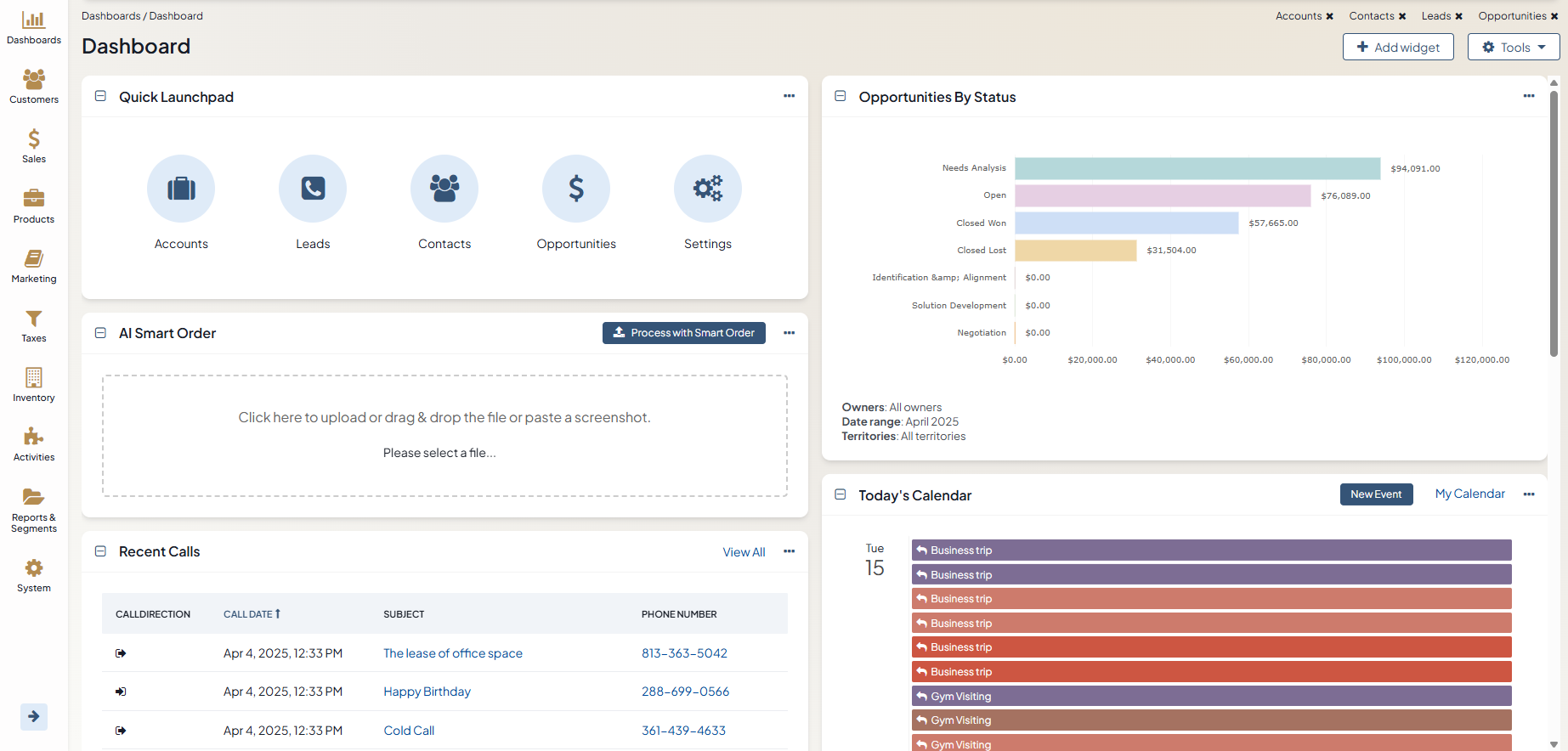
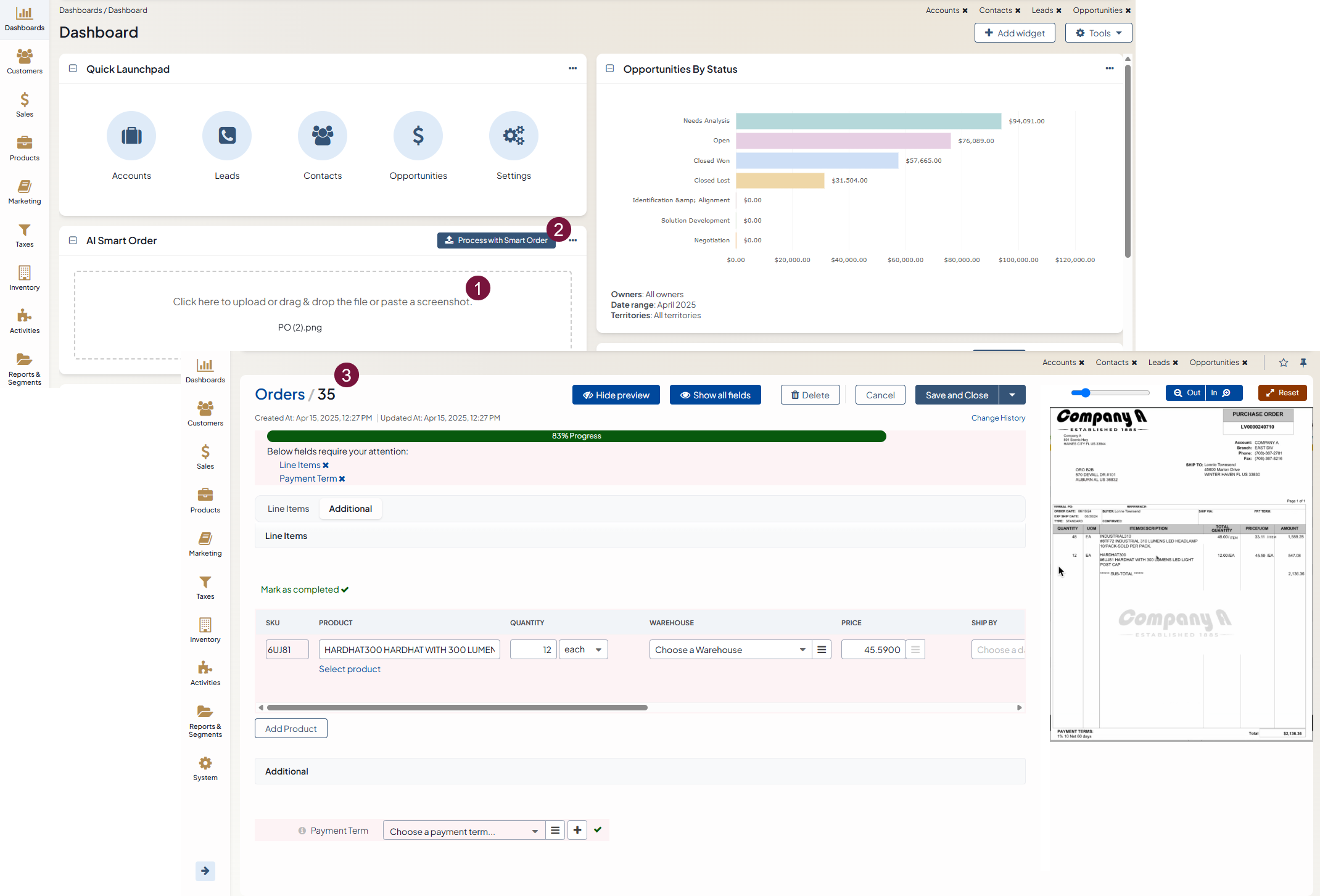
The AI Smart Order functionality is accessible through a dashboard widget and mailbox automation, making purchase order management even more efficient.
For developers, the OroOrderRecognitionBundle documentation describes how the recognized data becomes a draft order and how to customize that process.
Smart Order Widget
The Smart Order dashboard widget provides an intuitive interface for users to manually upload purchase order files or images for processing. This feature allows businesses to digitize and convert orders received through offline channels, ensuring all critical order details are accurately extracted and recorded in OroCommerce.
Smart Order Automation
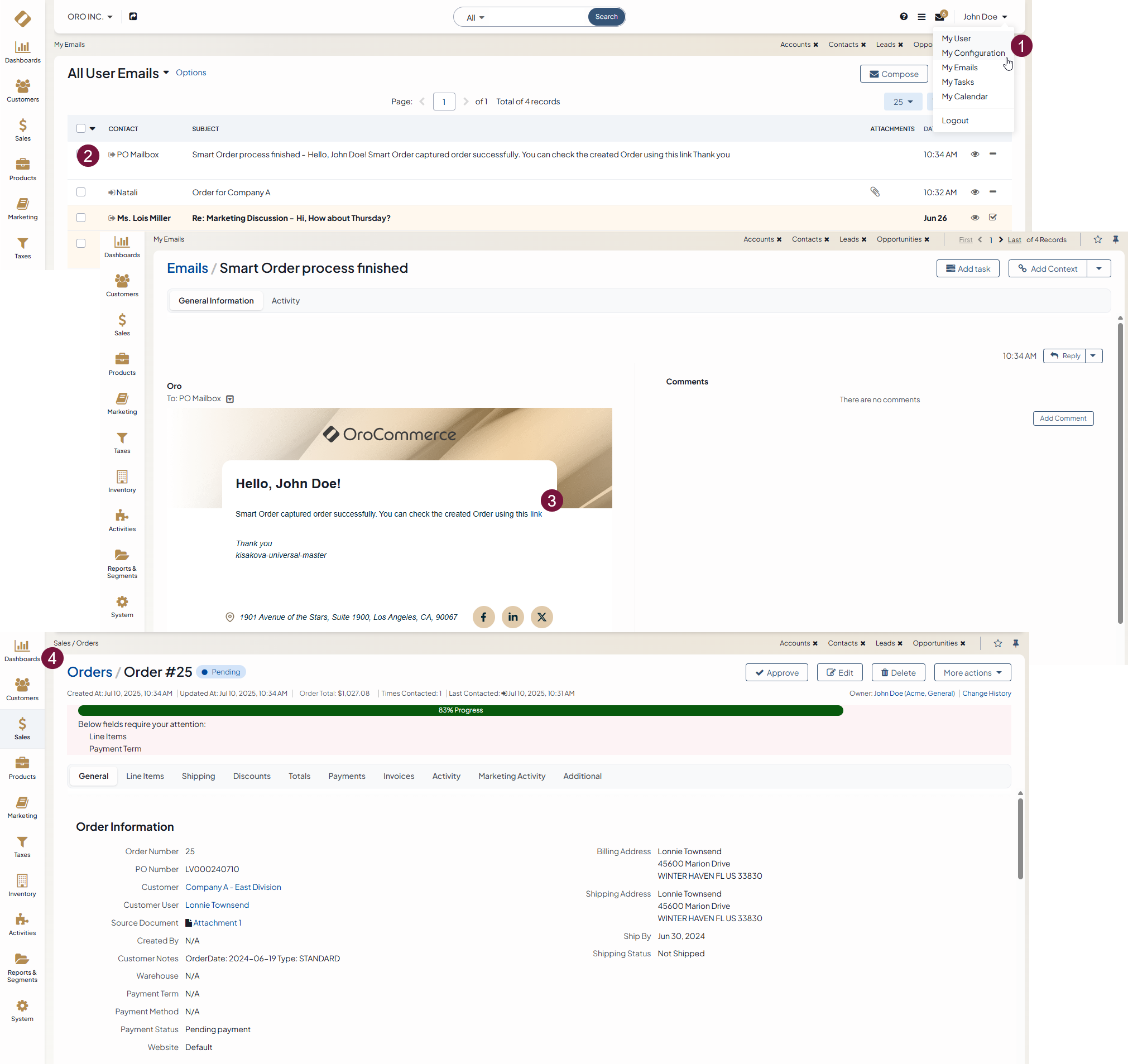
For businesses aiming to fully automate purchase order processing, OroCommerce provides the AI Smart Order functionality. It can scan incoming emails with attached purchase orders in JPG, PNG, or PDF format, extract relevant data, and automatically create a draft order in the back-office. This reduces manual uploads and data entry and minimizes the risk of errors.
For more information on how to set up Smart Order automation, see Create an Order via AI Smart Order Automation.
Model Context Protocol (MCP)
The Oro AI capabilities are built on the Model Context Protocol (MCP), an open standard that defines how AI assistants connect to the tools and data they act on. Instead of relying on a fixed, hardcoded set of capabilities, the Oro AI microservices, such as OroIQ and the AI Smart Agent, discover the operations they can perform directly from OroCommerce, where each operation is exposed as an MCP tool.
Because these tools are defined and managed within OroCommerce, you can customize which operations the AI is allowed to perform directly from the platform, tailoring the assistant to your business processes. For example, you can control whether the AI can find products, check inventory, create orders, or manage shopping lists, and expose additional operations built on top of the OroCommerce API as new MCP tools.
This keeps the AI aligned with OroCommerce business logic and permission structures, while allowing its capabilities to be extended or restricted without changing the underlying AI microservices. OroCommerce provides MCP servers for both the back-office and the storefront, which can also be connected to external MCP-compatible clients.
For configuration details, see the developer documentation for the OroCommerceMcpBundle and OroFrontendCommerceMcpBundle.
Related Articles: